AI agent on the web: a real GPU-backed Chrome for Claude
An AI agent that acts on the web (filling in a form, comparing offers, monitoring a dashboard) needs a real browser running continuously, somewhere other than your laptop. Two mistakes get it flagged as a robot from the very first page:
- running it in headless mode: Chrome then announces itself as
HeadlessChromein its User-Agent; - running it without a GPU: the graphics card becomes
SwiftShader(an emulated GPU), or WebGL disappears entirely.
A desktop PC never has these characteristics. So the rule is simple: a real Chrome, in a window, on a virtual display, with a real GPU.
This article shows how to run Chrome with the GPU for a Claude agent, compares Xvfb and Xorg “dummy”, covers Selenium, and explains what the GPU changes (or doesn’t) against Cloudflare’s bot detection. All measurements are reproducible: the script is public.
The architecture
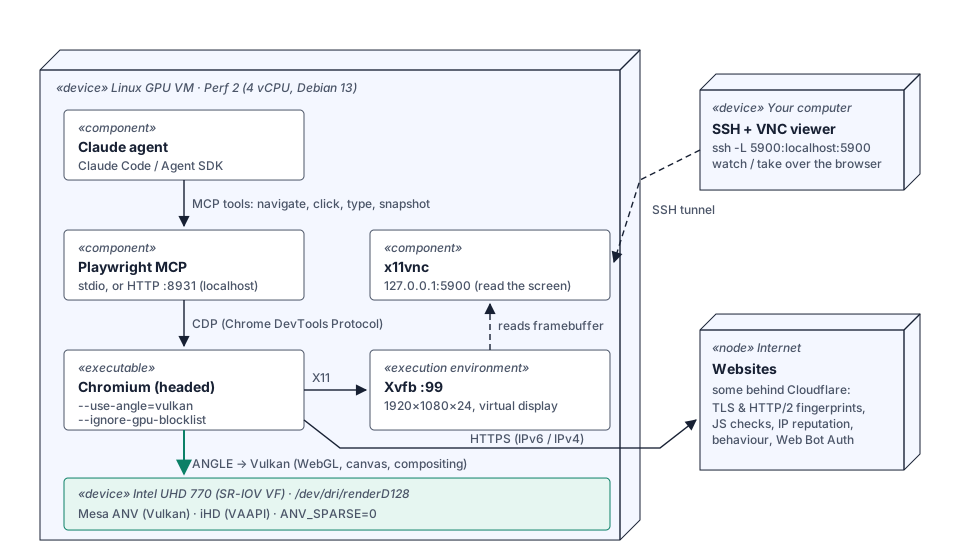
- The agent (Claude Code or the Claude Agent SDK) decides on the actions;
- Playwright MCP exposes the browser to the agent as tools
(
browser_navigate,browser_click,browser_type,browser_snapshot…) and drives Chromium over CDP (Chrome DevTools Protocol); - Chromium runs in windowed mode on an Xvfb virtual display, and renders on the GPU via ANGLE/Vulkan;
- x11vnc lets you watch the screen and take over (for two-factor authentication, for example).
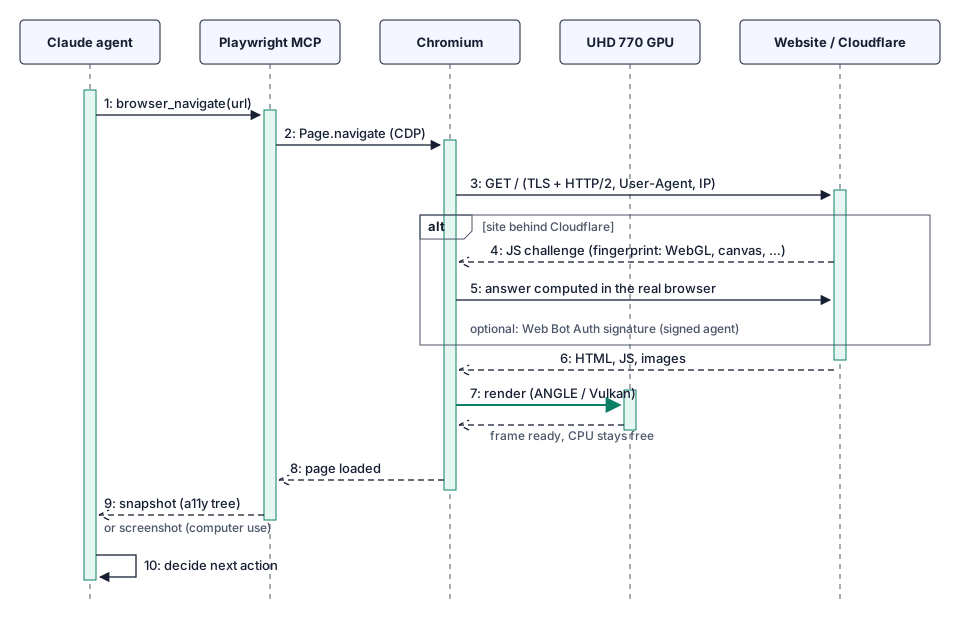
How an action unfolds:
The measurements
Conditions
- Linux GPU test server, VM configured like the Perf 2 plan (4 vCPU), Intel UHD 770 GPU shared between several VMs (the VM has its own GPU device, /dev/dri, with the standard Linux driver), Debian 13;
- Chromium 156, Playwright MCP 0.0.83, Selenium 4.31 + chromedriver 156,
Xvfb (Xorg 21) and
xserver-xorg-video-dummy0.4.0; - the GPU was not used by other VMs during the measurements;
- measured on 2026-10-29.
How it’s computed
The benchmark is a WebGL 2 page (webgl-bench.html):
- a 1920×1080 canvas;
- a fragment shader that computes 64 sines/cosines per pixel, about 265 million sines/cosines per image;
?draws=Ndraws N full-screen images per frame (requestAnimationFrame);- after each frame,
readPixelsreads one pixel: this forces the browser to finish rendering, otherwise it could queue the commands and report a flattering but wrong score; - after 5 s: images/s = number of images ÷ duration. We also check that the program linked correctly and that the pixel read has the right color.
Chrome is launched with --disable-gpu-vsync --disable-frame-rate-limit so it
isn’t capped at 60 images/s. CPU load is the difference of the /proc/stat
counters over the test duration only, expressed as busy vCPUs.
chromium --headless=new --use-angle=vulkan --ignore-gpu-blocklist \
  --disable-gpu-vsync --disable-frame-rate-limit \
  --enable-logging=stderr --v=0 "file:///root/webgl-bench.html?draws=10" \
  2>&1 | grep -m1 RESULT
Result 1: the GPU makes the difference (×20)
--headless=new, 10 images per frame:
| Rendering | 1080p images/s | Busy CPU |
|---|---|---|
| SwiftShader (default, CPU) | 13 | 3.9 of 4 vCPU |
UHD 770, --use-angle=vulkan | ~260 | 0.6 vCPU |
UHD 770, --use-angle=gl-egl | ~230 | — |
With the GPU, rendering is 20 times faster and the processor stays free. For an agent, this is the key point: without a GPU, a heavy page (map, dashboard, video) saturates all 4 vCPUs, and the agent, Playwright and the virtual display fight over what’s left.
Result 2: Xvfb or Xorg dummy, it doesn’t matter
You often hear that Xvfb should be replaced by Xorg with the dummy driver to “look more real”. Measured, in windowed mode, 1 image per frame:
| Virtual display | No flags | SwiftShader forced | GPU (--use-angle=vulkan) |
|---|---|---|---|
| Xvfb | WebGL disabled | 9.2 images/s | 67.6 images/s |
| Xorg + dummy driver | WebGL disabled | 8.7 images/s | 58.8 images/s, then WebGL context lost |
- Neither uses the GPU by itself:
glxinforeportsllvmpipe(software rendering) on both; - without flags, Chrome disables WebGL on both;
- with the dummy driver, our GPU run lost the WebGL context after a few
images (
eglCreateWindowSurface failed with error EGL_BAD_MATCH). Xvfb stayed stable.
The choice of virtual display is therefore secondary: the GPU is what matters for performance, most of the time. Stick with Xvfb, which is simpler, and add the two GPU flags to Chrome.
Result 3: which renderer the site sees
This is what a detection script reads (WEBGL_debug_renderer_info):
| Configuration | Reported WebGL renderer |
|---|---|
--headless=new without flags | SwiftShader (emulated CPU) |
| Xvfb or dummy, without flags | no WebGL |
| Selenium + Xvfb, without flags | no WebGL |
| Selenium + Xvfb, GPU flags | Intel(R) UHD Graphics 770 |
| Playwright MCP, windowed on Xvfb, GPU flags | Intel(R) UHD Graphics 770 |
| headless, GPU flags | Intel(R) UHD Graphics 770 |
Result 4: headless = spotted immediately
What a JavaScript script reads in one line on the page, in the four configurations (Chromium 156):
| Headless without GPU | Headless + GPU | Xvfb window without GPU | Xvfb window + GPU | |
|---|---|---|---|---|
navigator.userAgent | ❌ HeadlessChrome/156… | ❌ HeadlessChrome/156… | ✅ Chrome/156… | ✅ Chrome/156… |
| Graphics card (WebGL) | ❌ SwiftShader | ✅ Intel UHD Graphics 770 | ❌ none (WebGL off) | ✅ Intel UHD Graphics 770 |
screen | ❌ 800×600 | ❌ 800×600 | ✅ 1920×1080 | ✅ 1920×1080 |
| Window size | 780×580 | 780×580 | 945×1060 | 1919×1079 |
- Headless mode gives itself away: the word
HeadlessChromeis written in the User-Agent, sent with every request. It is the simplest signal to block, and every anti-bot system does. The 800×600 screen confirms the diagnosis; - without a GPU, even in a window, WebGL disappears: no modern desktop browser is in that situation;
- only the last column looks like a real workstation: a windowed Chrome on a 1080p screen, with a real Intel graphics card.
Patching the User-Agent by hand is not enough: headless mode has other differences (screen size, rendering behavior, missing APIs), and a User-Agent that doesn’t match the rest is itself suspicious. The most reliable option is not to use headless mode at all: on a server, that is exactly what Xvfb is for.
Result 5: in a window, the GPU takes a huge load off the CPU
Windowed mode has a cost: Chrome has to draw the whole page on screen. Without a GPU, the processor does everything. Same 1080p WebGL animation, Chrome in a window on Xvfb, normal frame rate (60 images/s maximum), CPU load measured across the whole VM during the test:
| Chrome in a window on Xvfb | Images/s | Busy CPU (4 vCPU VM) |
|---|---|---|
| Without GPU (SwiftShader) | 9.8 | 3.4 vCPU: the VM is saturated |
| Without GPU, 3× heavier scene | 4.0 | 3.7 vCPU |
| With the UHD 770 GPU | 60 (smooth) | 0.3 vCPU |
| With the GPU, 3× heavier scene | 60 | 0.3 vCPU |
With the GPU, Chrome displays 6 times more images while using more than 10 times less CPU, i.e. about 70 times less CPU per image. Without a GPU, the VM is saturated and doesn’t even reach 10 images/s: the agent, Playwright and the rest of the system fight over the crumbs, every action takes longer, and heavy pages become unusable. With the GPU, 3.7 vCPUs remain free for useful work.
That’s the winning combination: windowed mode avoids getting spotted, and the GPU makes it free for the processor.
What the GPU changes against Cloudflare
Cloudflare (Bot Management, Turnstile) combines many signals: TLS and HTTP/2
fingerprint, IP address reputation, in-page JavaScript checks, behavior
(pace, movements), statistical models. A browser without a GPU quickly
gives itself away in the JavaScript checks: SwiftShader as the graphics
card, or no WebGL at all, is a typical signature of an automated browser in
a datacenter.
With the GPU, Chrome reports a real Intel card and renders the page like a desktop PC. In practice, this reduces false positives: CAPTCHAs or blocks on sites your agent is perfectly entitled to visit.
But let’s be clear: CDP + driver + good IP does NOT make you undetectable.
- CDP automation itself leaves detectable traces;
- datacenter addresses are known as such;
- an agent’s behavior (speed, sequence of actions) can be spotted;
- the rules change constantly: what passes today will be blocked tomorrow.
The right approach: get recognized
For a legitimate agent, the sustainable path is to be identified rather than hidden:
- Web Bot Auth (“signed agents” at Cloudflare): the agent signs its HTTP requests with an Ed25519 key (HTTP Message Signatures, RFC 9421) and publishes its public key in a directory; sites can then explicitly allow it;
- an honest User-Agent, respect for
robots.txtand terms of service, a reasonable request rate; - on your own sites behind Cloudflare (E2E tests, monitoring), a WAF rule that lets your server’s IP through.
Setup
1. Packages
apt install chromium xvfb x11vnc nodejs npm2. Virtual display and VNC (systemd)
# /etc/systemd/system/xvfb.service
[Unit]
Description=Xvfb :99
[Service]
ExecStart=/usr/bin/Xvfb :99 -screen 0 1920x1080x24 -nolisten tcp
Restart=always
[Install]
WantedBy=multi-user.target
# /etc/systemd/system/x11vnc.service
[Unit]
Description=x11vnc on :99 (localhost only)
After=xvfb.service
Requires=xvfb.service
[Service]
ExecStart=/usr/bin/x11vnc -display :99 -localhost -forever -shared -nopw
Restart=always
[Install]
WantedBy=multi-user.targetsystemctl enable --now xvfb x11vnc
# from your computer:
ssh -L 5900:localhost:5900 root@your-server # then a VNC client on localhost:5900VNC only listens on localhost: it is reachable only through the SSH tunnel.
3. Playwright MCP with the GPU
File /root/mcp.json:
{
  "browser": {
    "browserName": "chromium",
    "launchOptions": {
      "executablePath": "/usr/bin/chromium",
      "headless": false,
      "args": ["--use-angle=vulkan", "--ignore-gpu-blocklist", "--no-sandbox"]
    }
  }
}
With Claude Code installed on the server:
claude mcp add playwright --env DISPLAY=:99 -- \
  npx @playwright/mcp@latest --config /root/mcp.json
Or as an HTTP server, if the agent runs elsewhere (SSH tunnel to the port):
DISPLAY=:99 npx @playwright/mcp@latest --config /root/mcp.json --port 8931
# MCP endpoint: http://localhost:8931/mcp
To check, ask the agent to open a page that shows the WebGL renderer: it
should report Intel(R) UHD Graphics 770.
4. Selenium + Xvfb
apt install python3-selenium chromium-driverfrom selenium import webdriver
from selenium.webdriver.chrome.service import Service
o = webdriver.ChromeOptions()
o.binary_location = "/usr/bin/chromium"
for a in ["--use-angle=vulkan", "--ignore-gpu-blocklist",
"--no-sandbox", "--window-size=1920,1080"]:
o.add_argument(a)
driver = webdriver.Chrome(options=o, service=Service("/usr/bin/chromedriver"))xvfb-run -a -s "-screen 0 1920x1080x24" python3 my_script.pyWith Debian’s Selenium 4.31, specify chromedriver explicitly via
Service(...): otherwise it can’t find it (NoSuchDriverException).
FAQ
Headless or windowed on Xvfb?
Windowed, without hesitation. Headless announces itself as HeadlessChrome
and gets blocked on most protected sites. Windowed mode also lets you
follow the agent over VNC and take over. Keep headless for your own tests,
on your own sites.
What about Claude’s computer use (screenshots + clicks)? It needs a real display: Xvfb + a windowed browser, exactly the setup above. The GPU renders each screenshot faster and leaves the CPU for everything else.
Is a Perf 1 plan enough? For an agent browsing ordinary sites, yes. The measurements above were made with 4 vCPU (Perf 2), useful if the agent opens several tabs or heavy pages.
Try it
Linux GPU server with an Intel UHD 770 inside the VM, Mesa and Vulkan already installed. From €14.99 excl. VAT/month, root access, dedicated IPv6. See also: Chrome with the GPU on a Linux server and Xvfb: a practical guide.