The *arr stack with Jellyfin and Plex: a reminder of how it fits together
Our Jellyfin & Plex hardware transcoding guide covers the media server itself. Around it, most self-hosters run a family of tools whose names end in arr: they organise the library, rename files, fetch subtitles and let your household request titles. This page is a short reminder of who does what and how they talk to each other.
Important: we do not encourage downloading content you do not have the rights to. These tools are neutral; what you feed them is your responsibility. On Linux GPU servers, downloading, storing or sharing pirated works (BitTorrent, Usenet, illegal IPTV…) is forbidden by Article 6 of our terms and leads to suspension. Use them with your own files (your rips, your music), public-domain works (Internet Archive, Wikimedia Commons) and free licences (Blender open movies, Creative Commons music).
The diagram
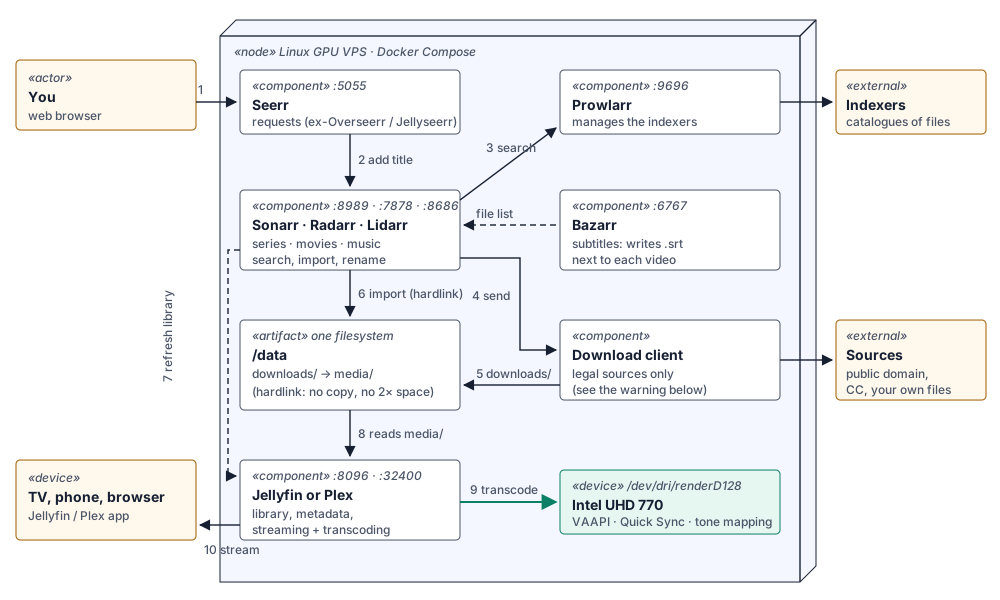
- You (or someone in your household) ask for a film or a series in Seerr.
- Seerr hands the request to Radarr (films) or Sonarr (series).
- The *arr app searches the sources configured in Prowlarr.
- It sends the chosen item to the download client.
- The file lands in
/data/downloads/. - The *arr app imports it: it renames it and places it in
/data/media/with a hardlink (instant, no extra disk space). - It tells Jellyfin or Plex to refresh the library; Bazarr adds the missing subtitles next to the video.
- Jellyfin or Plex reads
/data/media/. - When a device can’t play the original format, the server transcodes on the GPU (VAAPI / Quick Sync).
- The video streams to the TV, phone or browser.
No download client? The stack still works: drop your own files into a folder and use the Manual Import of Sonarr, Radarr or Lidarr to rename and file them.
Who does what
| Tool | Role | Default port |
|---|---|---|
| Jellyfin / Plex | Media server: library, metadata, streaming, GPU transcoding | 8096 / 32400 |
| Sonarr | Series: follows episodes, imports and renames them | 8989 |
| Radarr | Films: same job for movies | 7878 |
| Lidarr | Music: albums and artists, great for your own CD rips | 8686 |
| Prowlarr | Manages the sources (indexers) once and syncs them to the *arr apps | 9696 |
| Bazarr | Subtitles for everything Sonarr and Radarr manage | 6767 |
| Seerr | Request portal for your household, for Jellyfin, Plex and Emby | 5055 |
Seerr is the merger of Overseerr (Plex) and Jellyseerr (Jellyfin):
the two teams joined forces and released Seerr 3.0 in February 2026
(ghcr.io/seerr-team/seerr). Overseerr images are deprecated; if you still
run Overseerr or Jellyseerr, migrate to Seerr with a fresh data directory so
the old one stays as a rollback.
Readarr (books) was retired by its developers in 2025 and its repository is archived: for books and audiobooks, look at Audiobookshelf or LazyLibrarian instead.
The tools that usually come along
| Tool | What it adds |
|---|---|
| Recyclarr | Syncs well-known quality profiles and naming rules (TRaSH Guides) into Sonarr and Radarr |
| Unpackerr | Extracts archives so Sonarr / Radarr can import them |
| Tdarr | Re-encodes your library in bulk (e.g. to HEVC or AV1-friendly formats); it can use the Intel GPU with VAAPI / QSV |
| Tautulli (Plex) / Jellystat (Jellyfin) | Watch statistics, who played what, notifications |
| Kometa | Plex (and partly Jellyfin) collections, posters and overlays |
| Maintainerr | Rules to clean up what nobody watches |
| Wizarr | Invitation links to give someone access to Jellyfin or Plex |
| Audiobookshelf | Audiobooks and podcasts server |
| Homepage | One dashboard with all the services and their status |
One Docker Compose file
All the apps share one /data folder with downloads/ and media/ inside.
It must be the same filesystem for every container, otherwise hardlinks
turn into slow copies that double the disk usage.
mkdir -p /srv/data/{downloads,media/{movies,tv,music}} /srv/arr
cd /srv/arrdocker-compose.yml:
x-common: &common
  restart: unless-stopped
  environment:
    PUID: "1000"
    PGID: "1000"
    TZ: Europe/Paris
  volumes:
    - /srv/data:/data

services:
  sonarr:
    <<: *common
    image: lscr.io/linuxserver/sonarr:latest
    volumes: [/srv/data:/data, ./sonarr:/config]
    ports: ["127.0.0.1:8989:8989"]

  radarr:
    <<: *common
    image: lscr.io/linuxserver/radarr:latest
    volumes: [/srv/data:/data, ./radarr:/config]
    ports: ["127.0.0.1:7878:7878"]

  lidarr:
    <<: *common
    image: lscr.io/linuxserver/lidarr:latest
    volumes: [/srv/data:/data, ./lidarr:/config]
    ports: ["127.0.0.1:8686:8686"]

  prowlarr:
    <<: *common
    image: lscr.io/linuxserver/prowlarr:latest
    volumes: [./prowlarr:/config]
    ports: ["127.0.0.1:9696:9696"]

  bazarr:
    <<: *common
    image: lscr.io/linuxserver/bazarr:latest
    volumes: [/srv/data:/data, ./bazarr:/config]
    ports: ["127.0.0.1:6767:6767"]

  seerr:
    image: ghcr.io/seerr-team/seerr:latest
    init: true
    restart: unless-stopped
    environment:
      TZ: Europe/Paris
    volumes: [./seerr:/app/config]
    ports: ["5055:5055"]

  jellyfin:                      # or the plex service below
    image: jellyfin/jellyfin:latest
    restart: unless-stopped
    devices: [/dev/dri/renderD128:/dev/dri/renderD128]
    group_add: ["${RENDER_GID}"]
    volumes: [./jellyfin:/config, /srv/data/media:/data/media:ro]
    ports: ["8096:8096"]

  # plex:
  #   image: plexinc/pms-docker:latest
  #   restart: unless-stopped
  #   network_mode: host
  #   devices: [/dev/dri:/dev/dri]
  #   volumes: [./plex:/config, /srv/data/media:/data/media:ro]
echo "RENDER_GID=$(stat -c %g /dev/dri/renderD128)" > .env
docker compose up -dAdd the download client of your choice to the same file, with
/srv/data:/data as its volume and /data/downloads as its target folder,
for legal sources only.
Wiring the apps together
- Prowlarr → Settings → Apps: add Sonarr, Radarr and Lidarr with their API key (each app’s Settings → General). Prowlarr then pushes the same sources to all of them.
- Sonarr / Radarr / Lidarr → Settings → Media Management: root folders
/data/media/tv,/data/media/movies,/data/media/music; leave Use Hardlinks instead of Copy on. - Sonarr / Radarr → Settings → Connect: add Emby / Jellyfin or Plex Media Server so the library refreshes after each import.
- Bazarr → Settings → Sonarr / Radarr: same API keys, then pick your subtitle languages and providers.
- Seerr: the first-run wizard asks for Jellyfin or Plex, then Settings → Services to add Radarr and Sonarr.
- Jellyfin or Plex: libraries on
/data/media/...and GPU transcoding as in our transcoding guide.
Security
- Only Jellyfin/Plex and Seerr need to be reachable. The other apps listen on
127.0.0.1: open them through an SSH tunnel (ssh -L 8989:localhost:8989 support@your-server) or behind a reverse proxy with authentication. - Turn on authentication in every *arr app (Settings → General → Authentication).
- Keep the media folder read-only for the media server (
:roabove).
Storage
Plans come with 60 GB (Start), 120 GB (Power) or 240 GB SSD (Pro). That is plenty for the apps and a music or home-video library; for a large film collection, plan the disk size first, since hardlinks only work inside one filesystem.
Try it
A Linux GPU server with an Intel UHD 770 inside the VM, Docker already installed, VAAPI and Quick Sync ready for Jellyfin and Plex. From €14.99 excl. VAT/month, root access.