Free AI upscaling on a GPU server: Upscayl, Real-ESRGAN and Video2X tested
AI upscaling turns a small or blurry picture into a larger, sharper one: the model does not just stretch the pixels, it redraws fine detail such as hair, fur or the edges of a drawing. Paid tools like Topaz do it well, and online upscalers do it with upload limits, queues or watermarks. The free, open-source tools are just as easy to find: Upscayl (a desktop app built on Real-ESRGAN), and Video2X for video, which also does RIFE frame interpolation and Anime4K filters.
All of them run on Vulkan, which means they want a GPU. So we asked: on a cloud server with a shared Intel GPU, how much does the GPU really bring, compared with the CPU of the same server? We used the official binaries, the same pictures and the same video, and measured time, CPU and memory.
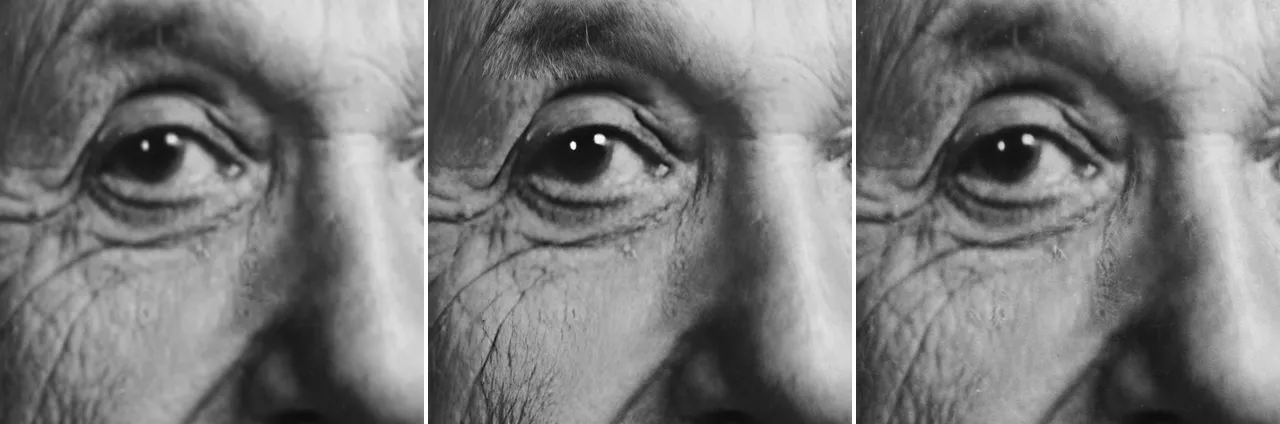
Results at a glance
- Pictures: the GPU is faster and leaves the CPU free. Enlarging a 512-pixel photo 4 times took 24.9 s on the GPU against 34.0 s on 4 vCPU (1.4 times faster) and 55 s on 2 vCPU (2.2 times faster). The GPU run used 0.1 vCPU; the CPU run kept 3.8 vCPU busy.
- Big pictures need memory on the CPU. A 1080p photo enlarged to 8K took 189 s on the GPU and 234 s on the CPU, and the CPU run peaked at 11.8 GB of RAM (1.2 GB with the GPU).
- Video2X has no CPU mode. Forced onto the CPU through software Vulkan, it was 4 to 6 times slower: Anime4K to 1080p ran at 12.2 frames per second on the GPU against 1.9, RIFE frame doubling at 7.3 against 1.1.
- Real-ESRGAN on video is slow, even on the GPU. The fast video model processed 0.65 frames per second: about 8 minutes for a 10-second clip. Fine for a short clip or a batch at night, not for a film.
- Be honest about the hardware. An integrated GPU is far slower than a desktop RTX card. The point is a €14.99 server that does the job without keeping its CPU busy.
Test setup
| Item | Value |
|---|---|
| Server | Debian 13, Linux 7.3, Intel UHD 770 (shared GPU), 4 vCPU, 12 GB of RAM |
| Pictures, GPU | upscayl-bin 20251207 (the engine the Upscayl app calls, official release) with the Real-ESRGAN models, Vulkan (Mesa 25.0.7), default tile size |
| Pictures, CPU | the official Real-ESRGAN PyTorch code (inference_realesrgan.py, PyTorch 2.15 CPU, fp32, 4 threads; 2 threads pinned to 2 vCPU for the “2 vCPU” result) |
| Video | Video2X 6.4.0 (official AppImage), output H.264 (libx264, CRF 18). CPU: the same Video2X on Mesa’s software Vulkan (llvmpipe), plus the official PyTorch video script for Real-ESRGAN |
| Pictures | three 512 × 512 photos, one 1920 × 1080 photo, one 854 × 480 cartoon frame |
| Video | 10 s of Big Buck Bunny at 854 × 480, 30 frames per second (300 frames) |
| Measures | wall time including model loading and writing the file, CPU time and peak memory from /usr/bin/time |
CPU figures are in vCPU (1.0 = one full core). The GPU is shared with other servers: we checked that it was otherwise idle for the runs used here (see “Limits”).
Test media: photos from Wikimedia Commons (Albert Einstein by Orren Jack Turner, public domain; Buzz Aldrin by NASA, public domain; a cat by Alvesgaspar, CC BY-SA 3.0) and Big Buck Bunny (© Blender Foundation, CC BY 3.0).
1. Pictures: Real-ESRGAN with Upscayl’s engine
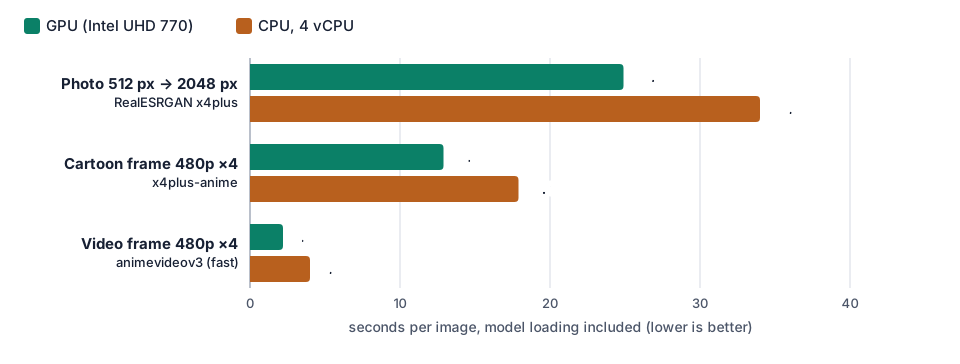
| Picture | Model | GPU | CPU, 4 vCPU | CPU, 2 vCPU |
|---|---|---|---|---|
| Photo 512 × 512 → 2048 × 2048 | RealESRGAN x4plus | 24.9 s, 0.1 vCPU, 1.0 GB | 34.0 s, 3.8 vCPU, 4.1 GB | 55.0 s |
| Photo 1920 × 1080 → 7680 × 4320 | RealESRGAN x4plus | 189 s, 0.03 vCPU, 1.2 GB | 234 s, 4.0 vCPU, 11.8 GB | — |
| Cartoon frame 854 × 480 → 3416 × 1920 | x4plus-anime | 12.9 s, 0.1 vCPU, 0.4 GB | 17.9 s, 3.6 vCPU, 6.0 GB | — |
| Video frame 854 × 480 → 3416 × 1920 | animevideov3 (fast) | 2.2 s, 0.6 vCPU | 4.0 s, 2.4 vCPU, 0.9 GB | — |
The photo time is the median of three different photos; they all took between 24.8 and 25 seconds on the GPU.
What it means:
- Against all 4 vCPU, the GPU is 1.2 to 1.8 times faster. That is a real gain, not a miracle: Real-ESRGAN’s photo model is heavy, and four modern CPU cores are not slow.
- Against 2 vCPU, the size of our Start plan, the GPU is 2.2 times faster. The GPU does not shrink with the plan; the CPU does.
- The GPU leaves the server free. During a GPU run, the server’s CPU stays at about 0.1 vCPU: you can run a web app, a gallery or a second job at the same time. On the CPU, the upscale takes everything.
- Memory. Without tiling, the PyTorch code needed 11.8 GB of RAM for the 1080p photo. On an 8 GB server you would have to cut the picture into tiles on the CPU too, which makes it slower again.
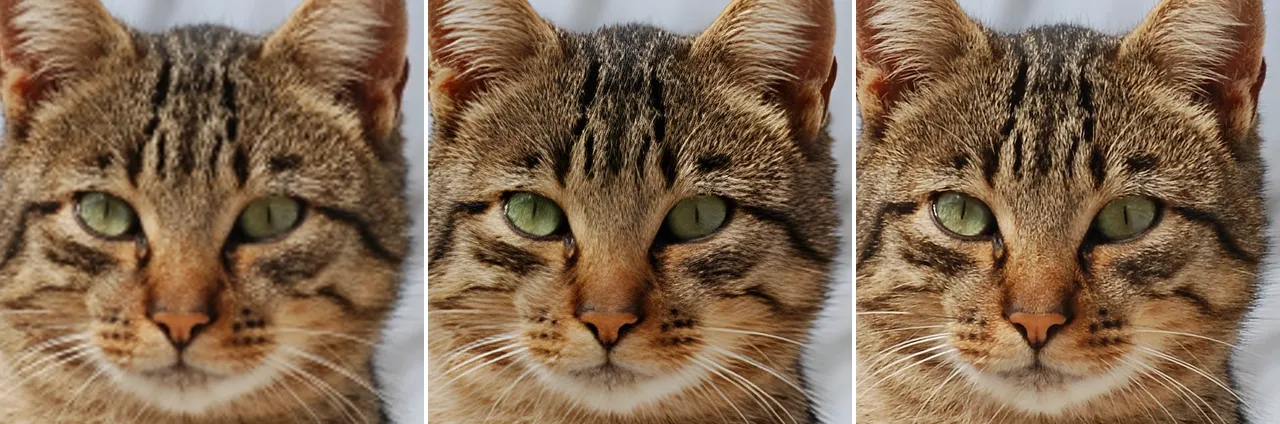

2. Video: Video2X with Real-ESRGAN, Anime4K and RIFE
Video2X reads a video, runs every frame through a filter on the GPU, and encodes the result with FFmpeg. It offers three kinds of work: Real-ESRGAN (AI upscaling, slow, best quality), Anime4K (fast GLSL shaders for cartoons, through libplacebo) and RIFE (AI frame interpolation: 30 to 60 frames per second).
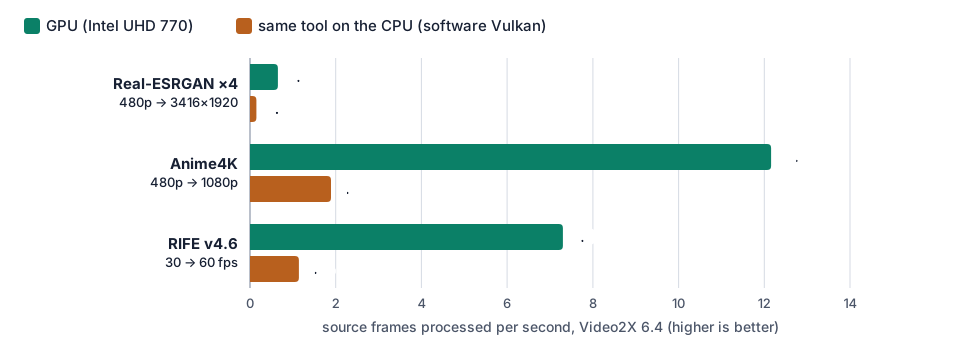
| Video2X job (854 × 480 source) | GPU | CPU (software Vulkan) | 10-second clip on the GPU |
|---|---|---|---|
| Real-ESRGAN animevideov3 ×4 → 3416 × 1920 | 0.65 fps, 0.1 vCPU | 0.15 fps, 3.8 vCPU | about 7 min 40 s |
| Real-ESRGAN animevideov3 ×2 → 1708 × 960 | 0.65 fps | — | about 7 min 40 s |
| Anime4K → 1920 × 1080 | 12.2 fps, 0.7 vCPU | 1.9 fps, 3.1 vCPU | 25 s |
| Anime4K → 3840 × 2160 | 7.4 fps, 1.5 vCPU | — | 40 s |
| RIFE v4.6, 30 → 60 fps | 7.3 fps (14.6 frames out per second), 0.2 vCPU | 1.1 fps, 3.1 vCPU | 41 s |
| Real-ESRGAN x4plus (photo model) ×4 | 0.02 fps (48 s per frame) | — | about 4 hours |
To compare Real-ESRGAN with a CPU tool that is actually optimised for the CPU, we also ran the official PyTorch video script on the 4 vCPU: 0.60 frames per second, nearly the speed of the GPU, but with the whole server busy (3.8 vCPU). For Anime4K and RIFE there is no such CPU tool: without a GPU, Video2X falls back to software Vulkan and is 6 times slower.
Practical advice from these numbers:
- For cartoons and anime, start with Anime4K: near real time in 1080p, and the result is clean.
- Use Real-ESRGAN’s animevideov3 model for video, never the photo model (x4plus): 48 seconds per frame makes a 10-second clip a four-hour job.
- RIFE is cheap: 41 seconds to turn a 10-second 480p clip from 30 into 60 frames per second.
- Long videos are a night job. At 0.65 frames per second, an episode of 20 minutes at 30 frames per second takes about 15 hours with Real-ESRGAN. The server does it while you sleep; that is what it is for.
3. Limits
- Shared GPU. The GPU is shared with other servers. When another server is using it, your jobs get a fair share but run slower: during our session, the same 1080p photo took 189 s when the GPU was otherwise idle and 226 to 268 s while another server was busy on it. The numbers above are with an otherwise idle GPU.
- Keep the default tile size. With
-t 512, each GPU job took longer than the driver allows and was stopped: the output pictures were black. The default (automatic) or-t 256work and are as fast. - No miracle. A desktop RTX card runs Real-ESRGAN many times faster. If you upscale thousands of 4K pictures every day, rent a dedicated GPU. If you upscale a photo library, old scans or short clips, this is enough.
- AI invents detail. Real-ESRGAN makes pictures look sharp, but the new detail is a guess. For documents, faces you must identify, or evidence, keep the original.
- The Upscayl app itself is a desktop program. On a server, use its engine
upscayl-binfrom the command line (below), as Upscayl does behind its buttons.
4. Which plan?
- iGPU Start (2 vCPU, 8 GB of RAM, Perf 1, €14.99 per month excl. VAT): photo upscaling with Upscayl’s engine, batches of pictures, Anime4K and RIFE on short videos. Here the GPU is 2.2 times faster than the 2 vCPU of the plan, and keeps them free.
- iGPU Power (4 vCPU, 14 GB of RAM, Perf 2 = twice the GPU share of Start, €29.99): Video2X jobs that run for hours, big pictures (1080p to 8K), or upscaling next to other services. The larger GPU share matters when other servers use the GPU at the same time.
- iGPU Pro (6 vCPU, 14 GB, Perf 3, €44.99): several long video jobs in a row, or upscaling plus other GPU work (transcoding, AI inference) on the same server.
5. Set it up on a Linux GPU server
Want it ready to use? Ask for it by email when you order (contact@linuxgpu.eu): we can deliver the server with upscayl-bin, the Real-ESRGAN models and Video2X already installed and tested on the GPU.
Our servers come with the Intel Vulkan driver installed; vulkaninfo --summary should list the
Intel UHD Graphics 770. Then, for pictures:
# Upscayl's engine and the Real-ESRGAN models (official releases)
wget https://github.com/upscayl/upscayl-ncnn/releases/download/20251207-174704/upscayl-bin-20251207-174704-linux.zip
wget https://github.com/xinntao/Real-ESRGAN/releases/download/v0.2.5.0/realesrgan-ncnn-vulkan-20220424-ubuntu.zip
unzip upscayl-bin-*-linux.zip && unzip -d realesrgan realesrgan-ncnn-vulkan-*-ubuntu.zip
U=./upscayl-bin-20251207-174704-linux/upscayl-bin

# one photo, 4 times larger, on the GPU (-g 0)
$U -i photo.jpg -o photo-x4.png -m realesrgan/models -n realesrgan-x4plus -g 0
# a whole folder, cartoon model, JPEG output
$U -i scans/ -o scans-x4/ -m realesrgan/models -n realesrgan-x4plus-anime -g 0 -f jpg
For video, Video2X 6.4 ships as an AppImage. Servers usually have no FUSE, so extract it once:
wget https://github.com/k4yt3x/video2x/releases/download/6.4.0/Video2X-x86_64.AppImage
chmod +x Video2X-x86_64.AppImage && ./Video2X-x86_64.AppImage --appimage-extract
cd squashfs-root/usr/share/video2x       # Video2X looks for its models from here
V=../../../AppRun
$V -l                                     # device 0 should be the Intel UHD 770

# Real-ESRGAN, 2 times larger
$V -i ~/clip.mp4 -o ~/clip-x2.mp4 -p realesrgan --realesrgan-model realesr-animevideov3 -s 2 -c libx264 -e crf=18
# Anime4K to 1080p
$V -i ~/clip.mp4 -o ~/clip-1080p.mp4 -p libplacebo --libplacebo-shader anime4k-v4-a -w 1920 -h 1080
# RIFE: 30 to 60 frames per second
$V -i ~/clip.mp4 -o ~/clip-60fps.mp4 -p rife --rife-model rife-v4.6 -m 2
Run long jobs inside tmux or with nohup so they keep going after you log out.
For the video engine of the same GPU (decoding and encoding with VA-API), read Video transcoding without a dedicated GPU and our Intel Quick Sync and VA-API FFmpeg cheat sheet. For other AI models on the same GPU, see AI inference on an integrated GPU.
Try it
See the plans: iGPU Start is €14.99 and iGPU Power €29.99 per month excl. VAT.