Frigate without a Coral: object detection on the Intel GPU with OpenVINO
Frigate is the open-source video recorder (NVR) that Home Assistant users love: it watches your cameras and tells a person from a car, a cat or a shadow. For years the advice was “buy a Google Coral” to run its object detector. Today Frigate also runs its detector with OpenVINO on an Intel GPU, and it can decode the video on the same GPU with VA-API.
So we asked a simple question: on a cloud server with a shared Intel GPU, what does the GPU really bring to Frigate? We ran the same cameras on the same server with the work on the GPU, then on the CPU only, with 1, 4 and 8 cameras.
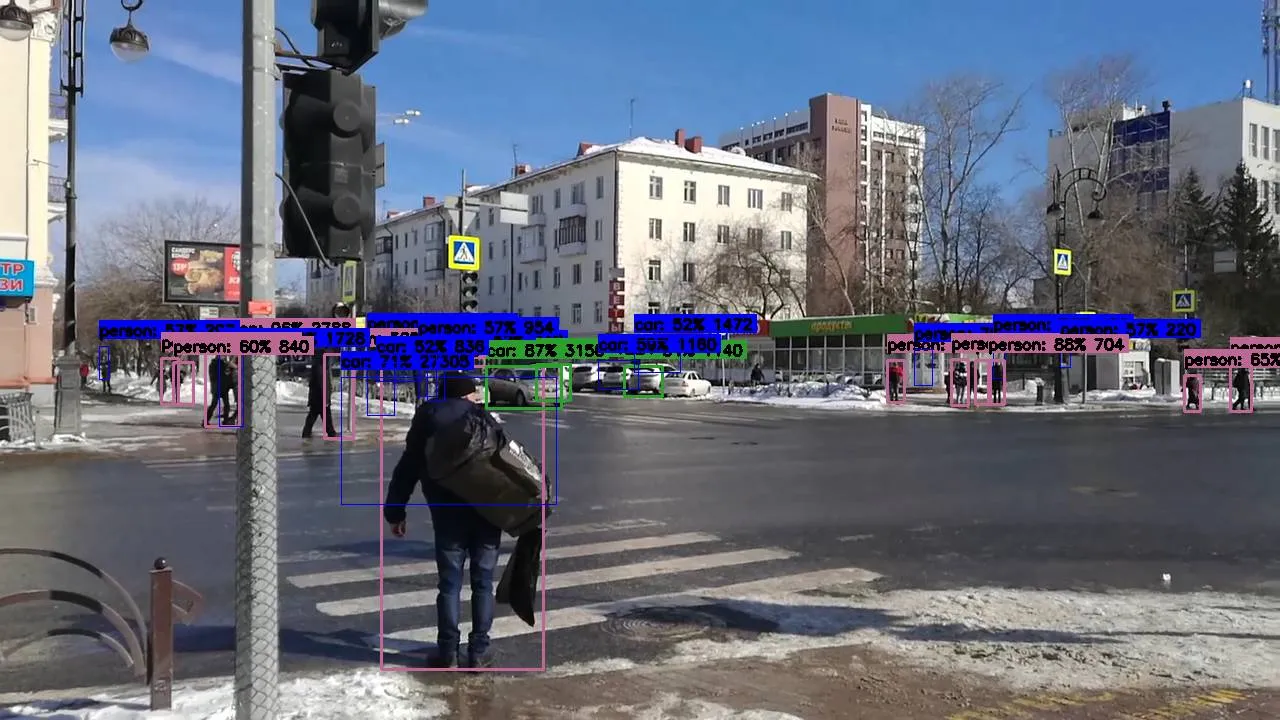
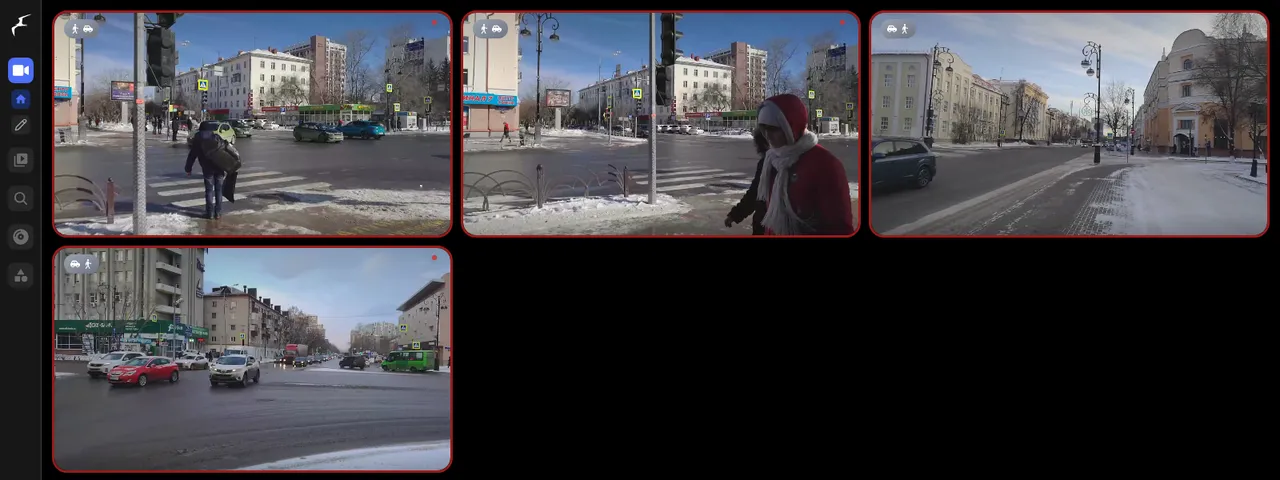
latest.jpg?bbox=1). Video: RG72, Wikimedia Commons, CC BY-SA 4.0.Results at a glance
- The GPU frees the CPU. With decoding and detection on the GPU, Frigate used 0.57 vCPU for 1 camera, 0.90 for 4 and 1.04 for 8. With everything on the CPU it used 2.16 vCPU for 1 camera, and the 4 vCPU of the server were full (96 to 97 %) from 4 cameras on.
- More detection when it gets busy. With 8 busy cameras, the GPU detector checked 168 objects per second against 107 on the CPU (+57 %), and Frigate analysed 62 % of the frames against 44 %.
- Detection time per frame is close. OpenVINO took about 5.6 to 6.7 ms per inference on the GPU and 7.2 to 10.8 ms on the CPU in most runs. The real gain is not speed, it is that the CPU stays free.
- Video decoding on the GPU cost about 1.7 % of one core per 1080p camera, against about 12 % when the CPU decodes. Eight 1080p streams used about a quarter of the GPU’s video engine.
- No Coral needed. One cloud server with the GPU handled 8 busy street cameras with 3 vCPU to spare.
Test setup
| Item | Value |
|---|---|
| Server | Debian 13, Linux 7.3, Intel UHD 770 (shared GPU), 4 vCPU, 12 GB of RAM |
| Frigate | 0.18.2 (official Docker image ghcr.io/blakeblackshear/frigate:stable), --device /dev/dri |
| Detector | type: openvino, device: GPU or device: CPU, model SSDLite MobileNet v2 300×300 shipped in the image |
| Decoding | hwaccel_args: preset-vaapi (GPU) or no hardware acceleration (CPU) |
| Cameras | 1, 4 or 8 RTSP streams, H.264 1920×1080 at 25 fps, 4 Mbit/s each, served by MediaMTX on the same server |
| Video | looped clips of busy street crossings from Wikimedia Commons (licences in the captions) |
| Frigate settings | detection at 1280×720 and 5 fps per camera, objects: person, car, bicycle, motorcycle, bus, truck, no recording |
| Measures | 60 s warm-up, then 90 s; CPU of the whole server from /proc/stat, Frigate’s /api/stats every 5 s, GPU engines from the kernel (DRM fdinfo) |
CPU figures are in vCPU (1.00 = one full core out of the 4). “Objects checked per second” is Frigate’s
detection_fps: how many image regions went through the detector each second, all cameras together.
Our clips are a hard case: city crossings with people and cars moving all the time, so Frigate runs the detector on 10 to 20 regions per frame. A driveway or a shop entrance that is still most of the time needs far less detection.
1. Server CPU: the main difference
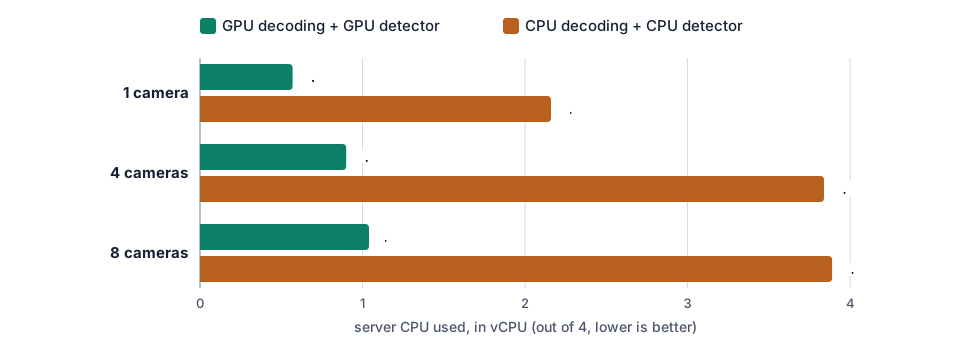
| Cameras | Everything on the GPU | GPU detector, CPU decoding | CPU detector, GPU decoding | Everything on the CPU |
|---|---|---|---|---|
| 1 | 0.57 vCPU (14 %) | 0.40 vCPU (10 %) | 2.80 vCPU (70 %) | 2.16 vCPU (54 %) |
| 4 | 0.90 vCPU (23 %) | 1.23 vCPU (31 %) | 3.83 vCPU (96 %) | 3.84 vCPU (96 %) |
| 8 | 1.04 vCPU (26 %) | 1.68 vCPU (42 %) | 3.85 vCPU (96 %) | 3.89 vCPU (97 %) |
The detector is what fills the CPU. When OpenVINO runs on the CPU, Frigate’s detector process alone used 2.4 to 3.1 cores; on the GPU it used 0.1 to 0.3 of a core. Video decoding comes second: each 1080p stream cost about 12 % of a core when the CPU decoded it and 1.7 % with VA-API. With one camera the difference between GPU and CPU decoding is within the noise; from 4 cameras on, VA-API saves a visible part of the CPU.
2. How much detection can the server do?
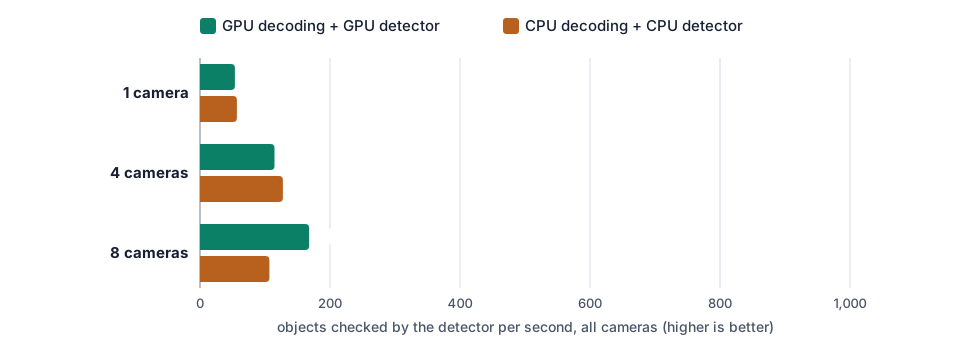
| Cameras | Objects checked / s | Frames analysed / received | Inference time | |
|---|---|---|---|---|
| 1 | Everything on the GPU | 53.7 | 5.0 / 5.0 | 6.7 ms |
| 1 | Everything on the CPU | 56.8 | 5.0 / 5.1 | 8.3 ms |
| 4 | Everything on the GPU | 114.6 | 11.7 / 20.1 | 8.5 ms |
| 4 | GPU detector, CPU decoding | 173.4 | 17.8 / 20.1 | 5.6 ms |
| 4 | Everything on the CPU | 127.5 | 13.3 / 20.2 | 7.2 ms |
| 8 | Everything on the GPU | 167.9 | 25.1 / 40.3 | 5.8 ms |
| 8 | Everything on the CPU | 106.8 | 17.8 / 40.4 | 9.1 ms |
With one camera both modes keep up with every frame. With 4 and 8 busy cameras, Frigate’s single detector becomes the limit: when it is full, Frigate skips frames (it keeps tracking objects, but looks at them less often). On the GPU the detector topped out at about 165 to 175 objects per second; on the CPU it reached 107 to 136 while taking the whole server.
Be fair with one result: the run “4 cameras, everything on the GPU” came out slower (8.5 ms per inference, 115 objects per second) than the run with CPU decoding (5.6 ms, 173 per second). The GPU is shared with other servers and the inference time moved between 5.6 and 11.6 ms on the GPU across our runs, so read the throughput figures as orders of magnitude, not as exact limits. The CPU figures did not change that picture: on the CPU, the server is always full.
3. Connecting your cameras to a cloud Frigate
Frigate in the cloud needs to read the RTSP stream of each camera at home or at the office. There are three ways to do it, and only the first one should be your default.
Recommended: a VPN (Tailscale or WireGuard), nothing opened
Install Tailscale (or plain WireGuard) on a small device that stays on in the same network as the cameras: a Raspberry Pi, a NAS, or a router that supports WireGuard. That device becomes a subnet router: it lets the cloud server reach the local network through an encrypted tunnel. Frigate then uses the cameras’ local addresses, as if it were at home, and no port is opened on your router.
# on the Raspberry Pi / NAS at home (your camera network here is 192.168.1.0/24)
echo 'net.ipv4.ip_forward = 1' | sudo tee /etc/sysctl.d/99-tailscale.conf && sudo sysctl -p /etc/sysctl.d/99-tailscale.conf
sudo tailscale up --advertise-routes=192.168.1.0/24
# approve the route in the Tailscale admin console, then on the cloud server:
sudo tailscale up --accept-routes
# Frigate, on the cloud server: the camera keeps its local address
cameras:
entrance:
ffmpeg:
inputs:
- path: rtsp://frigate:<camera-password>@192.168.1.50:554/stream1
roles: [detect, record]The video is encrypted end to end, the camera never faces the Internet, and you can open Frigate’s web page from your phone through the same tailnet. We explain Tailscale in more detail in Moonlight and Tailscale: play on your cloud server from anywhere.
Possible: port forwarding on the router, with strict limits
You can also forward a port on your router to the camera and give Frigate an address such as
rtsp://user:password@<your-public-ip>:8554/stream1. It works, but know the risks:
- RTSP is usually not encrypted. The video, and with some cameras the password, cross the Internet in clear text.
- Cheap camera firmware is a classic botnet target. An exposed camera is scanned within hours.
If you choose this way, these precautions are mandatory:
- On the router, allow the forwarded port only from the server’s IP address. Our servers have a fixed IP address, which is what makes this acceptable. If your router cannot filter by source address, use the VPN instead.
- A strong password, unique to the camera, never the default one.
- RTSPS (RTSP over TLS) if the camera supports it.
- Up-to-date firmware.
Never: a camera open to the whole Internet
A camera reachable by anyone, with or without a password, is how private videos end up on public websites and cameras end up in botnets. Do not do it, even “just for a test”.
What it costs in bandwidth and law
- Upload bandwidth: each camera sends its stream all the time, usually 1 to 4 Mbit/s in 1080p H.264. Our test streams were 4 Mbit/s each, so 8 of them would need 32 Mbit/s of upload. Fibre handles that; a slow DSL line does not. If upload is short, use the camera’s second, low-resolution stream for detection and keep full-quality recording on the camera’s SD card.
- Personal data: video of people is personal data. For a business filming staff or customers, the GDPR applies (information signs, limited retention, a contract with the host). Our servers are in the EU.
4. Coral and a mini PC, or a server per month?
| Coral + mini PC at home | Cloud server with GPU | |
|---|---|---|
| Cost | bought once: a mini PC around €150 to €250, a USB Coral around €60 to €80, a disk, plus about 10 W of power all year | €14.99 per month excl. VAT (iGPU Start) or €29.99 (iGPU Power) |
| Over 3 years | roughly €300 to €400 with electricity | €540 (Start) to €1,080 (Power) excl. VAT |
| Upload | none, the video stays at home | 1 to 4 Mbit/s per camera, all the time |
| Off-site copy | no: a burglar can take the recorder | yes: recordings are away from the cameras |
| Several sites | one box per site, or a VPN between them | one Frigate for all sites |
| Maintenance | your hardware, your disk, your power cuts | we keep the server running; you manage Frigate |
Prices for the Coral and the mini PC are typical street prices at the time of writing; check them before you buy. A recent Intel mini PC (N100 and similar) can also run OpenVINO on its own GPU, without a Coral.
Home hardware suits you if you already run a home server, have a slow upload, or want the video never to leave the house. A cloud server suits you if you have no home server (or a Raspberry Pi or NAS too weak for detection), want recordings stored away from the cameras, run several sites (shops, offices, holiday home), or want Frigate and Home Assistant reachable from anywhere without opening your home network.
5. Which plan?
With decoding and detection on the GPU, Frigate used about 1 vCPU for 8 busy cameras.
- iGPU Start (2 vCPU, 8 GB of RAM, Perf 1, €14.99 per month excl. VAT): a home or a small shop with 1 to 4 cameras, with Home Assistant next to it.
- iGPU Power (4 vCPU, 14 GB of RAM, Perf 2 = twice the GPU share of Start, €29.99): 4 to 8 cameras, busy scenes, recording on the server, or several sites. This is the size we tested.
- iGPU Pro (6 vCPU, 14 GB, Perf 3, €44.99): more cameras, or Frigate plus other GPU work (Immich, transcoding) on the same server.
Without the GPU, the same 4 vCPU were full from 4 cameras on: you would need a much bigger server to do the same work on the CPU.
6. Set it up on a Linux GPU server
Want it ready to use? Ask for it by email when you order (contact@linuxgpu.eu): we can deliver the server with Frigate already installed with OpenVINO and VA-API on the GPU, and Tailscale ready to connect to your cameras.
To do it yourself on Debian 13 with Docker:
docker run -d --name frigate --restart unless-stopped --shm-size=512m \
  --device /dev/dri \
  -v /srv/frigate/config:/config -v /srv/frigate/media:/media/frigate \
  --tmpfs /tmp/cache:size=1g -p 8971:8971 \
  ghcr.io/blakeblackshear/frigate:stable
# /srv/frigate/config/config.yml
mqtt:
enabled: false # or your Home Assistant MQTT broker
ffmpeg:
hwaccel_args: preset-vaapi # decode on the GPU
detectors:
ov:
type: openvino
device: GPU # detect on the GPU
model:
width: 300
height: 300
input_tensor: nhwc
input_pixel_format: bgr
path: /openvino-model/ssdlite_mobilenet_v2.xml
labelmap_path: /openvino-model/coco_91cl_bkgr.txt
cameras:
entrance:
ffmpeg:
inputs:
- path: rtsp://frigate:<camera-password>@192.168.1.50:554/stream1
roles: [detect]
detect:
enabled: true
width: 1280
height: 720
fps: 5Get the admin password with docker logs frigate 2>&1 | grep -i password, then open
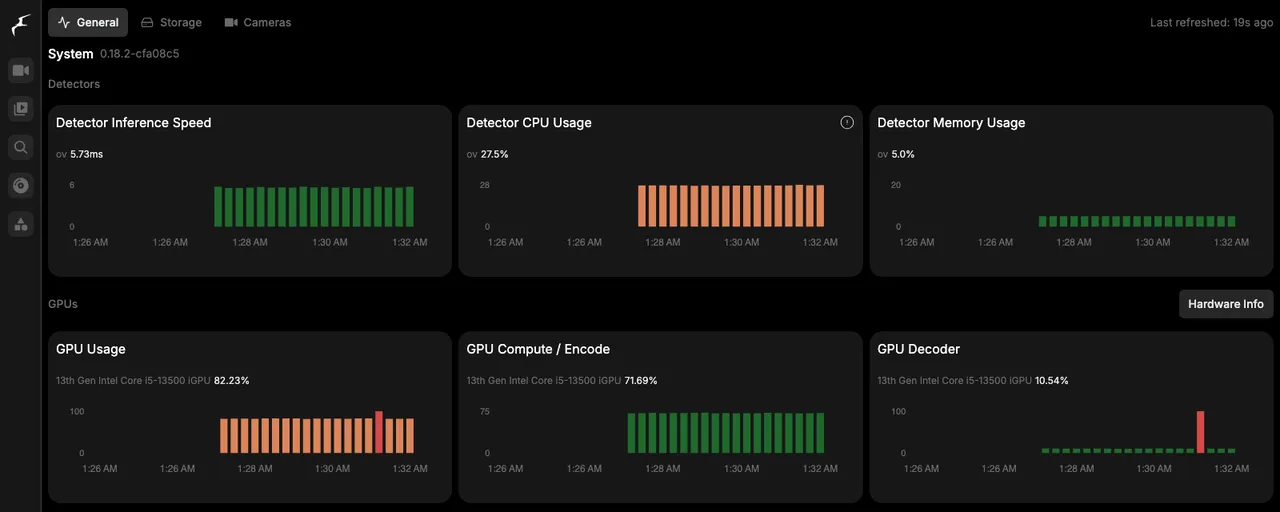
https://<server>:8971 (better: only through Tailscale). On the System page, the detector should show
an inference time of a few milliseconds and the GPU should be listed.
For Frigate next to Immich on the same server, with Docker Compose files, read Self-host Immich and Frigate with OpenVINO on a GPU VPS.
Try it
See the plans: iGPU Start is €14.99 and iGPU Power €29.99 per month excl. VAT.