A Linux desktop in the cloud with a GPU: what the GPU really changes
More and more people want a Linux desktop that lives on a server: a work environment that is the same from every computer, a browser that runs away from your laptop, a place for AI desktop apps and agents that keep running when you close the lid. Tools such as Kasm Workspaces, webtop, Apache Guacamole or RustDesk all answer that need. Most of them draw the desktop in software, on the CPU.
So we asked a simple question: on a cloud server with a shared Intel GPU, what does the GPU bring to a remote desktop? We ran the same desktop on the same server, streamed to a client at 1080p and 60 fps, first with the GPU drawing the apps and encoding the stream, then with everything done by the CPU.
Results at a glance
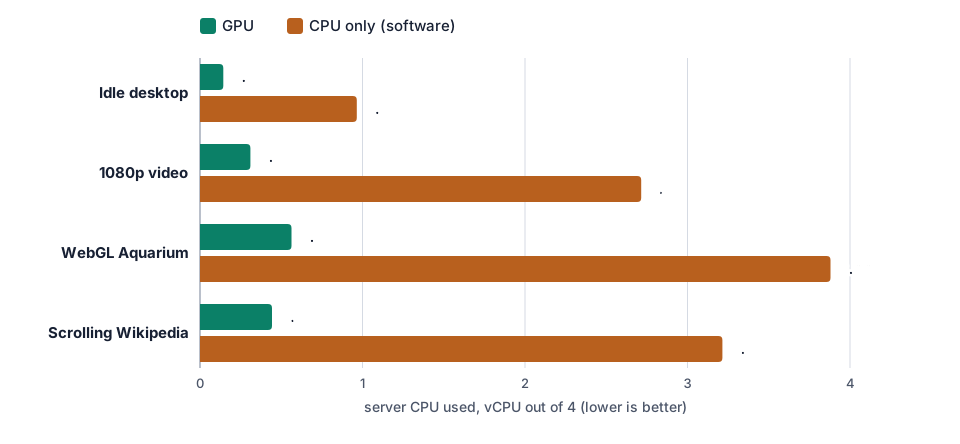
- The GPU keeps the server free. With the GPU, the whole desktop and its stream used 0.14 vCPU at rest, 0.31 for a 1080p video, 0.44 for scrolling a heavy web page and 0.56 for a WebGL scene, out of 4. In software the same tasks took 0.96, 2.71, 3.21 and 3.88 vCPU: from video playback on, the server was close to full.
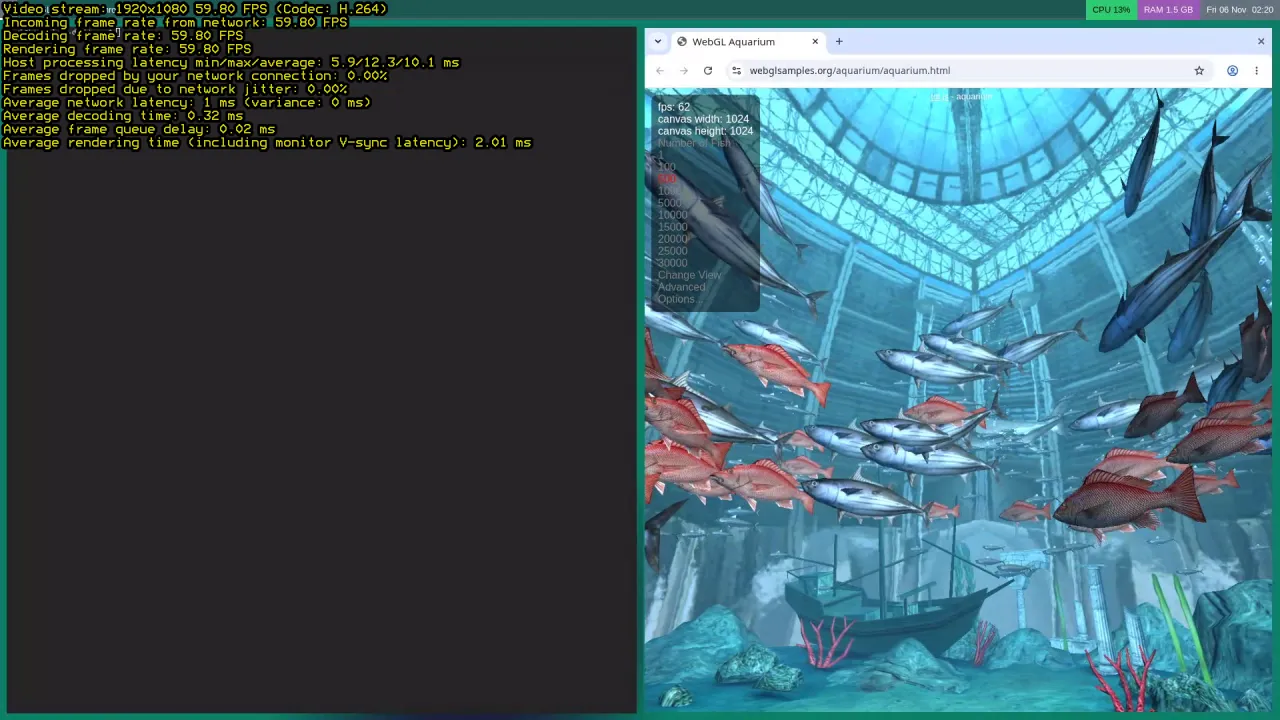
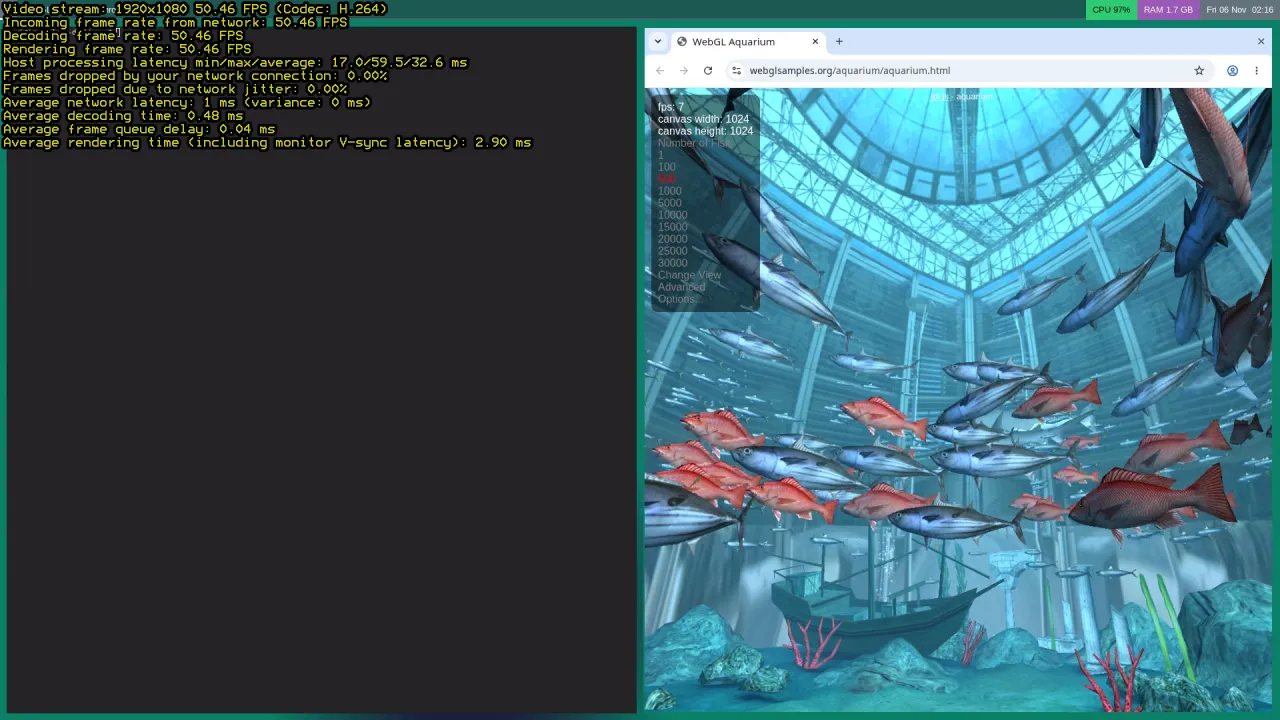
- 3D in the browser needs the GPU. WebGL Aquarium ran at 62 fps on the GPU and 7 fps in software, while using all 4 vCPU. Without a software fallback flag, Chromium simply turns WebGL off.
- A smoother, faster stream. With the GPU, Moonlight received 60 fps in every test and Sunshine needed 8 to 11 ms per frame on the server. In software the stream dropped to 52 to 59 fps and took 25 to 32 ms per frame as soon as something moved.
- Encoding alone: 0.1 core instead of 1. Sunshine’s H.264 encoder on the GPU (VA-API) used 0.10 to 0.15 of a core; the x264 software encoder used 0.81 to 1.19 cores for the same 1080p60 stream.
- 0 GPU hang on the host during the whole test.
Test setup
| Item | Value |
|---|---|
| Server | Debian 13, Linux 7.3, Intel UHD 770 (shared GPU), 4 vCPU, 8 GB of RAM |
| Desktop | sway (Wayland, Debian package) in headless mode, 1920×1080, waybar, foot terminal; Xwayland for X11 apps |
| Browser | Chromium 156 (Debian package), native Wayland |
| Streaming | Sunshine 2026.914 (capture = wlr), H.264 1080p 60 fps at 15 Mbit/s |
| Client | Moonlight (Qt AppImage) on a second server in the same data centre (1 ms network), hardware decoding |
| GPU mode | Chromium on the GPU (OpenGL ES through Mesa, video decoding with VA-API), Sunshine encoder = vaapi |
| Software mode | Chromium with SwiftShader (Chrome’s CPU renderer) and no hardware video decoding, Sunshine encoder = software (x264 superfast) |
| Tests | idle desktop; Big Buck Bunny 1080p30 H.264 in a full-screen <video>; WebGL Aquarium (500 fish); en.wikipedia.org/wiki/Linux scrolled 12 px per frame |
| Measures | 12 s warm-up then 30 s per test while Moonlight streams; CPU of the whole server from /proc/stat; frame rates from the page (requestAnimationFrame, getVideoPlaybackQuality); Moonlight’s end-of-stream statistics. 3 runs on the GPU, 2 in software, averaged |
CPU figures are in vCPU (1.00 = one full core out of the 4). In both modes the window manager itself draws on the GPU: Sunshine cannot capture a sway session drawn by the CPU. A server without any GPU would therefore do a little worse than our software mode.
1. Server CPU: the main difference
| Test | GPU: server | of which Chromium | of which Sunshine | Software: server | of which Chromium | of which Sunshine |
|---|---|---|---|---|---|---|
| Idle desktop | 0.14 vCPU | — | 0.10 | 0.96 vCPU | — | 0.92 |
| 1080p video | 0.31 vCPU | 0.12 | 0.14 | 2.71 vCPU | 1.23 | 1.45 |
| WebGL Aquarium | 0.56 vCPU | 0.37 | 0.15 | 3.88 vCPU | 2.84 | 1.00 |
| Scrolling Wikipedia | 0.44 vCPU | 0.25 | 0.15 | 3.21 vCPU | 1.91 | 1.23 |
Two things fill the CPU in software. First the apps: Chromium needed 1.2 cores to decode and show a 1080p video, and 2.8 cores to draw the aquarium badly. Then the stream: the software encoder costs about one core all the time, even when nothing moves on the screen, because it still sends 60 frames per second. On the GPU, both jobs move to dedicated engines: in our measures the GPU’s video engine was 15 to 43 % busy and its 3D engine 5 to 30 %.
Without any stream (the desktop alone, with nobody connected), the GPU desktop used 0.00 vCPU at rest, 0.10 for the video and 0.26 for the aquarium.
2. Frame rates: the page and the stream
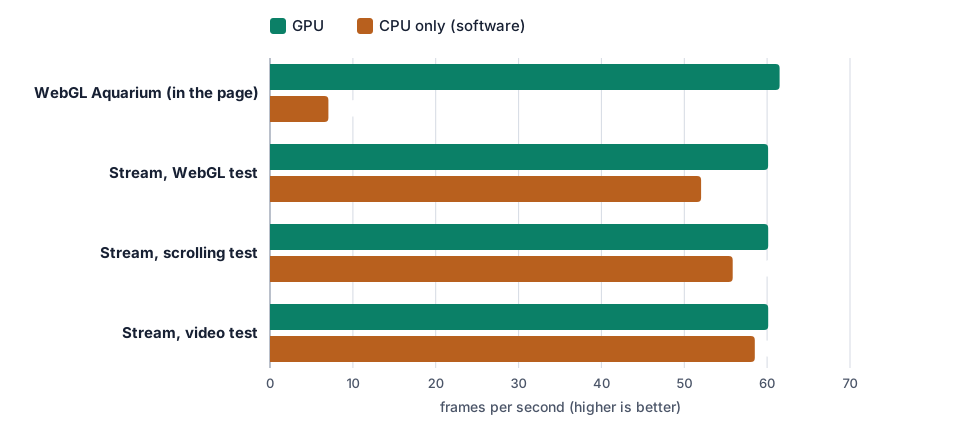
With the GPU, every page ran at the full 60 fps of the screen (61.5 to 61.8 measured by the page) and the video played its 30 frames per second without dropping one. In software the video also played without loss and scrolling stayed at 60 fps inside the page, but the server was so busy that the stream lost frames: Moonlight received 58.5 fps during the video, 55.8 while scrolling and 52.0 with the aquarium. On the screen, that is a desktop that stutters.
3. Stream latency on the server
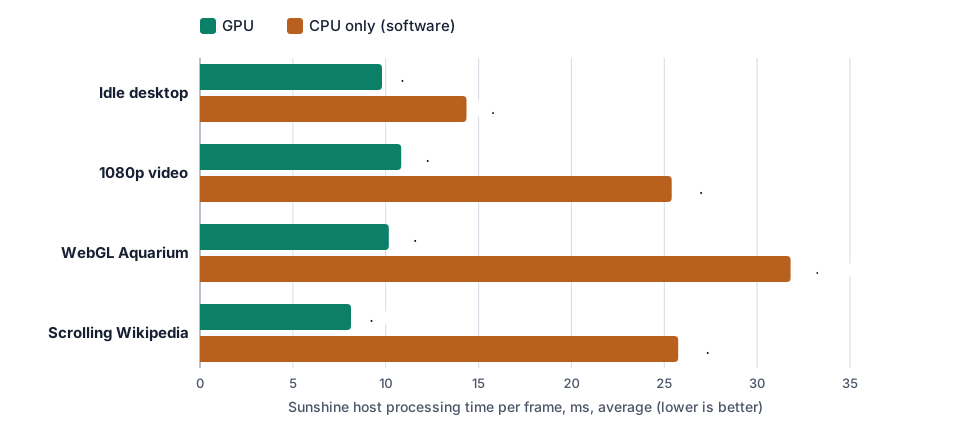
Moonlight reports the time each frame spends on the server (“host processing latency”). With the GPU it was 8.1 to 10.8 ms on average, with peaks around 20 to 32 ms. In software it was 14 ms at rest and 25 to 32 ms as soon as the screen moved, with peaks of 51 to 67 ms. Your Internet latency comes on top of that: our client was 1 ms away, in the same data centre.
4. The encoder alone: VA-API against x264
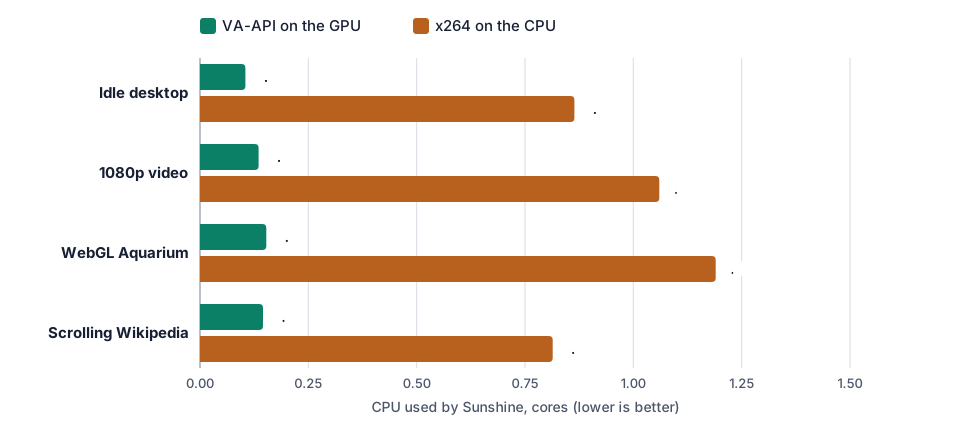
To isolate the encoder, we kept the apps on the GPU and only switched Sunshine from VA-API to x264. Sunshine went from 0.10-0.15 core to 0.81-1.19 cores, and the time per frame on the server from 8-11 ms to 12-17 ms. We also timed the encoders with ffmpeg on 60 seconds of raw 1080p video:
| Encoder (H.264, 15 Mbit/s) | Fastest speed | CPU for one 1080p60 stream |
|---|---|---|
h264_vaapi (GPU) | 194 fps | 0.18 core |
h264_vaapi, low-power mode (GPU) | 254 fps | 0.19 core |
libx264 superfast, zero latency (CPU) | 126 fps | 1.35 cores |
libx264 veryfast (CPU) | 78 fps | 2.31 cores |
On 2 vCPU, a software encoder alone would take more than half of the server. The GPU’s encoder could handle three 1080p60 streams at the same time.
5. What it looks like, and what you can run
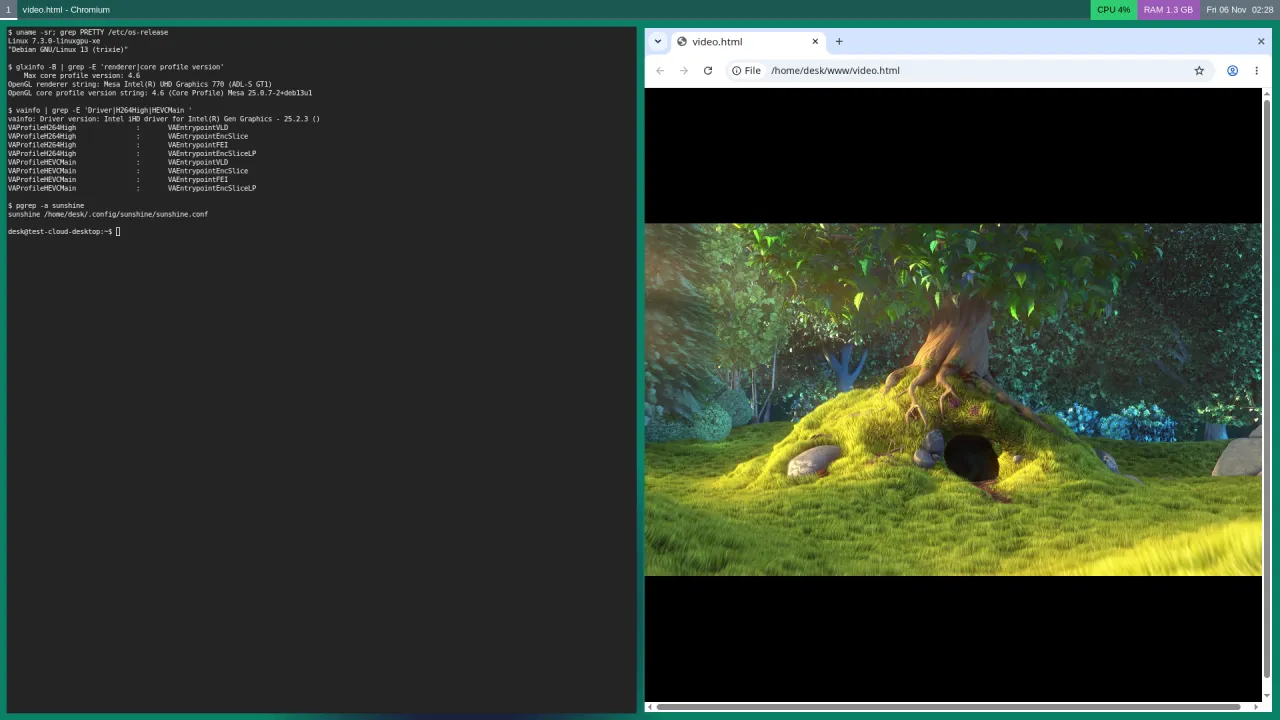
It is a normal Linux desktop: a browser with WebGL and hardware video, a terminal, office apps, an IDE, image editing, and desktop apps for AI. Community builds of Claude Desktop for Linux exist, for example; they are unofficial packages, not supported by Anthropic, and we did not install one here because it needs an account. The same goes for apps that drive a browser for an AI agent: see OpenClaw on a GPU server and Headless Chrome with GPU on Linux.
The desktop used between 1.3 and 1.7 GB of RAM with Chromium open.
6. An app or a browser?
We tested Sunshine and Moonlight because they use the GPU at both ends: VA-API encoding on the server,
hardware decoding on your device, and clients for Windows, macOS, Linux, Android, iOS and Apple TV.
Moonlight was made for games, so it is very responsive, but it has no file transfer: use scp, SFTP or a
sync tool for files.
If you prefer a browser and nothing to install, projects such as Selkies (WebRTC), Kasm Workspaces or webtop stream a desktop to a web page, and Apache Guacamole relays RDP or VNC. We did not measure them here. Check whether the desktop behind them is drawn on the GPU and whether the stream is encoded with VA-API: a desktop drawn by Xvfb or xrdp is software only, like our software mode.
7. Connecting safely
Sunshine opens several ports (47984 to 48010) and a web admin page on port 47990. Never expose them to the Internet. Put the server and your devices on a private network with Tailscale (or WireGuard) and connect Moonlight to the server’s Tailscale address:
# on the server and on each device
curl -fsSL https://tailscale.com/install.sh | sh
sudo tailscale up
# the server's firewall can then drop every Sunshine port except on tailscale0
Pair each device once with Sunshine’s PIN, then keep the admin page reachable only through the tailnet or
an SSH tunnel (ssh -L 47990:localhost:47990 <server>). We explain the whole setup step by step in
Moonlight and Tailscale: play on your cloud server from anywhere.
8. Set it up yourself
Want it ready to use? Ask for it by email when you order (contact@linuxgpu.eu): we can deliver the server with the desktop, Sunshine on the GPU and Tailscale already installed.
On Debian 13, as root:
apt install sway waybar foot xwayland seatd chromium intel-media-va-driver-non-free vainfo
# Sunshine: the Debian 13 ("trixie") .deb from github.com/LizardByte/Sunshine/releases
apt install ./sunshine-*trixie*amd64.deb
useradd -m -G video,render,input desk && systemctl enable --now seatd
Then, as the desk user, start sway without a screen and Sunshine on the GPU:
mkdir -p ~/.config/sway ~/.config/sunshine
printf 'output HEADLESS-1 resolution 1920x1080\nbar swaybar_command waybar\n' > ~/.config/sway/config
printf 'capture = wlr\nencoder = vaapi\nadapter_name = /dev/dri/renderD128\n' > ~/.config/sunshine/sunshine.conf
export XDG_RUNTIME_DIR=/run/user/$(id -u)
# headless = no screen; libinput = keyboard and mouse sent by Moonlight (through uinput)
LIBSEAT_BACKEND=seatd WLR_BACKENDS=headless,libinput WLR_RENDER_DRM_DEVICE=/dev/dri/renderD128 \
  dbus-run-session sway &
sleep 3; WAYLAND_DISPLAY=wayland-1 sunshine ~/.config/sunshine/sunshine.conf &
Sunshine’s log should say Creating encoder [h264_vaapi]. Start Chromium with --ozone-platform=wayland; then chrome://gpu should list the
Intel UHD 770 and the aquarium should run at the screen’s frame rate. Without libinput in
WLR_BACKENDS, the desktop shows fine but ignores the keyboard and mouse.
Limits of this test
- One user, 4 vCPU, a client 1 ms away. Over the Internet, add your connection’s latency. We did not test audio or several users at once.
- sway is a tiling window manager. It runs very well without a screen. GNOME and KDE Plasma need a different headless setup that we did not measure here.
- The GPU is shared. Other servers use it too, so frame times can move a little when they are busy. Each plan has its own share of the GPU (Perf 1, 2 or 3).
- Our software mode still used the GPU for the window manager. A server with no GPU at all would be slower than what we measured in software.
Which plan?
With the GPU, the streamed desktop used 0.1 to 0.6 vCPU and about 1.5 GB of RAM in our tests.
- iGPU Start (2 vCPU, 8 GB of RAM, Perf 1, €14.99 per month excl. VAT): one person’s desktop for browsing, office work, development and AI desktop apps. With the GPU, a 1080p video or a WebGL page leaves more than one vCPU free; in software, 2 vCPU would already be full.
- iGPU Power (4 vCPU, 14 GB, Perf 2 = twice the GPU share of Start, €29.99): heavy browsing with many tabs, 3D in the browser, design work, or a desktop plus Docker services and AI agents on the same server. This is the size we tested.
- iGPU Pro (6 vCPU, 14 GB, Perf 3, €44.99): a desktop next to heavier GPU work such as transcoding or local AI models.
Try it
See the plans: iGPU Start is €14.99 and iGPU Power €29.99 per month excl. VAT.