OpenClaw on a GPU server: why the GPU matters for your AI agent
OpenClaw is the open-source AI assistant everyone is installing this year: one Gateway that you run on your own machine, which connects your chat apps to an AI agent able to browse the web, run commands, handle files and media, and use skills. Many people buy a Mac mini just to keep it running. A server does the same job, always on, and away from your personal computer. This article explains what a GPU changes for OpenClaw on a server, using the measurements of our AI agent browser test.
In short
- OpenClaw drives a real browser (a managed Chromium profile: tabs, clicks, screenshots, PDFs). Without a GPU, that browser draws pages with the processor: in our test, a 1080p WebGL page ran at 13 images/s with 3.9 of 4 vCPU busy. With the Intel UHD 770: about 260 images/s with 0.6 vCPU.
- Websites see a real graphics card:
Intel UHD Graphics 770instead ofSwiftShaderor no WebGL at all, which is a typical signature of an automated browser. - The CPU stays free for the agent itself: the Gateway, its tools and your skills.
- Media and local models can use the GPU too: video conversion with Quick Sync, image and text models with OpenVINO.
We did not benchmark OpenClaw itself: the figures below come from our test of Chrome driven by an AI agent on the same hardware (4 vCPU, Intel UHD 770, Debian 13).
1. What OpenClaw needs on a server
According to the official documentation:
| Need | What OpenClaw uses |
|---|---|
| Runtime | Node 24 or 26, one Gateway process (Linux, macOS, Windows/WSL2, Docker) |
| Model | a provider API key, or local models (an Ollama server, through its native API) |
| Browser | a managed browser profile (Chrome, Chromium, Brave or Edge) that the agent controls: tabs, clicks, typing, snapshots, screenshots, PDFs |
| Access | the Web Control UI listens on 127.0.0.1: reach it through an SSH tunnel or Tailscale |
The browser is the heavy part. Every page the agent opens is drawn, scrolled and screenshotted, often in a loop. That is where the GPU comes in.
2. The browser: 20× faster with the GPU
On a server without a GPU, Chrome falls back to SwiftShader, a graphics card emulated by the processor. Same 1080p WebGL page, headless Chrome, 4 vCPU server:
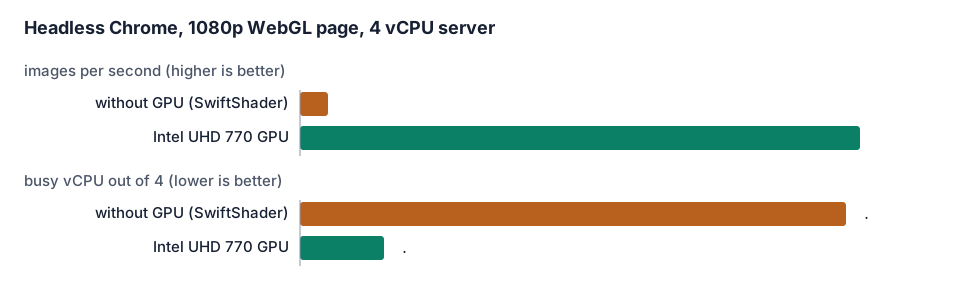
For an agent, the second line matters as much as the first: when the browser takes 3.9 of 4 vCPU, the Gateway, the model calls and your skills wait. A heavy page (a map, a dashboard, a video) is enough to slow the whole assistant down.
3. What websites see
Sites that fight bots read the graphics card reported by the browser
(WEBGL_debug_renderer_info):
| Browser setup | Graphics card reported |
|---|---|
| Server without GPU, default headless | SwiftShader (emulated) |
| Server without GPU, virtual display | no WebGL at all |
| Server with the Intel UHD 770 | Intel UHD Graphics 770 |
SwiftShader or a missing WebGL is a classic sign of an automated browser. A real GPU does not
make an agent invisible, and you must respect each site’s terms, but it removes one obvious reason
to be blocked or shown endless challenges. The details and the Chrome flags we used are in
our AI agent browser article.
4. Media and local models
OpenClaw handles media (images, audio, video) sent from your chat apps. On our servers the same Intel GPU also has:
- a video engine (Quick Sync / VA-API) to convert or shrink videos without loading the CPU: see our ffmpeg Quick Sync commands;
- OpenVINO support for vision, OCR and small language models on the GPU: see AI inference on an integrated GPU.
For the main model, a hosted API (Anthropic, OpenAI…) remains the most capable choice; a small local model served by Ollama works for simple tasks and keeps your data on your server.
5. Why a server rather than your own computer
- Isolation: OpenClaw can run commands and read files. On a dedicated server it only sees what you put there, not your personal machine.
- Always on: your assistant answers at night and while your laptop is closed.
- Private access: keep the Web Control UI on
127.0.0.1and reach it through an SSH tunnel or Tailscale, with no port open on the Internet. Restrict who can talk to the agent with OpenClaw’s allowlists.
6. Mac mini or Linux GPU server?
| Linux GPU server (iGPU Start / Power) | Dedicated Mac mini (M4) | |
|---|---|---|
| Price | from €14.99 / €29.99 per month excl. VAT | from €95 per month |
| Browser on the GPU | yes, Intel UHD 770 | yes, Apple GPU |
| Apple-only features (iMessage, Apple apps) | no | yes |
| Best for | an always-on agent that browses, converts media, runs small local models | agents that need macOS |
Both are available from us: choose the Mac mini only if your agent needs macOS.
Which plan?
iGPU Start (2 vCPU, 8 GB) is enough for an agent that browses now and then. If it browses all day, handles video or runs a local model next to the Gateway, take iGPU Power (4 vCPU, 14 GB, twice the GPU share of Start): our browser figures were measured on 4 vCPU.
Want it ready to use? Ask by email when you order (contact@linuxgpu.eu): we can deliver the server with OpenClaw’s prerequisites installed and Chrome set up to render on the GPU. You then connect your own model account and chat apps.
Try it
See the plans: iGPU servers from €14.99 per month excl. VAT, dedicated Mac mini from €95 per month.