Play on your cloud server from anywhere with Moonlight and Tailscale
Our servers are reached over IPv6 by default. Many home connections have IPv6, but not all: some mobile
networks, hotel Wi-Fi and older boxes only have IPv4. You can add a dedicated IPv4 to your server
(€5 per month), but there is another way that also keeps Sunshine’s ports closed to the Internet:
Tailscale. It builds a private, encrypted network (a “tailnet”) between your devices, based on
WireGuard. Your server and your phone each get an address in 100.x.y.z, and Moonlight connects to that
address as if both were at home.
Results at a glance
- It works with the official Tailscale client on both sides: direct connection between the two
machines (
tailscale ping: pong via 203.0.113.10:41641 in 1ms), Moonlight on100.x.y.1. - Tailscale costs nothing measurable in the stream: alternating runs with and without Tailscale gave the same 1080p 60 fps, 7.3 to 7.8 ms of server-side processing on both paths, 0 frames dropped.
- Sunshine is closed to the Internet: its ports only accept connections arriving through the tailnet. Only the tunnel is used; nothing needs to be opened on your box.
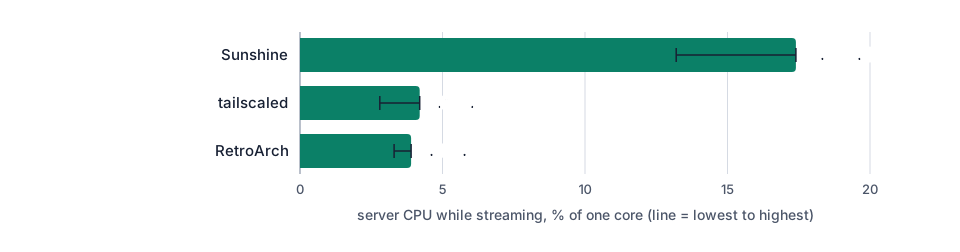
- Small CPU cost: the Tailscale service used 3 to 4 % of one core on the server while streaming 1080p at 15 Mbit/s.
Two ways to get a tailnet
| Tailscale account | Headscale | |
|---|---|---|
| What it is | Tailscale’s own service manages your network (free Personal plan) | Open-source control server you run yourself |
| Client software | official Tailscale apps | the same official Tailscale apps |
| Setup | log in on each device | install Headscale, create keys, point each device to it |
| Reachability | always reachable | Headscale must be reachable by all your devices |
The normal path is a Tailscale account: install Tailscale on the server and on your devices, log in with the same account, done. In our test we used Headscale instead, because we did not want to create an account for a test: it is an open-source server that plays the same role as Tailscale’s coordination service. The network itself is the same: both machines ran the official Tailscale client (version 1.104.5), which builds the same WireGuard tunnels whichever control server it talks to.
Test setup
| Item | Value |
|---|---|
| Server | Debian 13, Intel UHD 770 (shared GPU), 4 vCPU, Sunshine 2026.914, RetroArch, headless sway |
| Client | Debian 13, Moonlight 6.2, H.264 1080p 60 fps, hardware decoding |
| Tailnet | Tailscale 1.104.5 on both, Headscale 0.29.7 on the server (official .deb from GitHub) |
| Network | client and server in the same data centre: on the Internet, add your connection’s latency |
1. Install Tailscale on the server
Tailscale publishes packages for Debian 13:
curl -fsSL https://pkgs.tailscale.com/stable/debian/trixie.noarmor.gpg \
  -o /usr/share/keyrings/tailscale-archive-keyring.gpg
curl -fsSL https://pkgs.tailscale.com/stable/debian/trixie.tailscale-keyring.list \
  -o /etc/apt/sources.list.d/tailscale.list
apt update && apt install tailscale
With a Tailscale account, run tailscale up and open the link it prints to log in. Then install the
Tailscale app on your computer, phone or TV box and log in with the same account.
With Headscale (what we tested), install the server from its official GitHub release, set
server_url in /etc/headscale/config.yaml, then create a user and a key:
headscale users create gamer
headscale preauthkeys create --user 1 --reusable --expiration 2h
tailscale up --login-server https://headscale.example.com --authkey <key> --hostname retro-server
The client joins with the same tailscale up --login-server … --authkey … command. In our test,
Headscale listened on the server’s private address, because both machines were in the same data
centre. For real use, Headscale must be reachable by all your devices, over HTTPS: run it on a machine
with a public IPv4 (for example with the dedicated IPv4 option), otherwise a device without IPv6 cannot
reach it. That is the main reason why a Tailscale account is simpler.
2. Check the connection
$ tailscale status
100.x.y.2  retro-client  gamer  linux  -
100.x.y.1  retro-server  gamer  linux  active; direct 203.0.113.10:41641, tx 750808 rx 128908072

$ tailscale ping 100.x.y.1
pong from retro-server (100.x.y.1) via 203.0.113.10:41641 in 1ms
direct means the two machines talk to each other without a relay. Over the Internet, Tailscale
also tries to connect your devices directly through the home router (the server has outbound IPv4 for
that). When it cannot, traffic goes through a Tailscale relay (“DERP”): it still works, but adds
latency. tailscale status tells you which one you got.
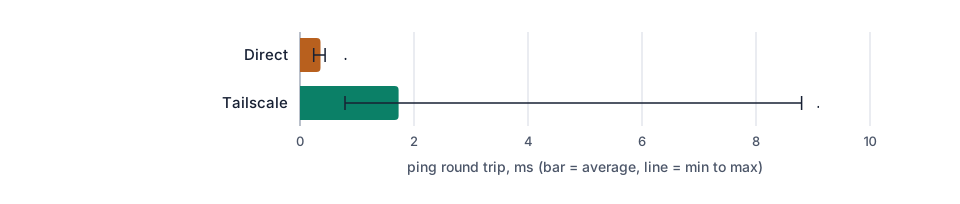
An ordinary ping through the tunnel took 1.7 ms on average (0.8 ms at best) against 0.36 ms without Tailscale: WireGuard encryption adds well under a millisecond, which is invisible next to the latency of an Internet connection.
3. Keep Sunshine closed to the Internet
The point of the tailnet is that Sunshine does not need to be reachable from the Internet. On the
server, a small nftables table drops Sunshine’s ports except on the tailscale0 interface:
nft -f - <<'EOF'
table inet sunshine_tailnet_only {
  chain input {
    type filter hook input priority 0; policy accept;
    iifname "tailscale0" accept
    iifname "lo" accept
    tcp dport { 47984, 47989, 47990, 48010 } drop
    udp dport 47998-48010 drop
  }
}
EOF
We checked it from the client: Sunshine’s port 47989 no longer answered on the server’s normal address,
and answered (HTTP 200) on 100.x.y.1. To pair Moonlight, open Sunshine’s web interface through an SSH
tunnel (ssh -L 47990:localhost:47990 you@100.x.y.1).
4. Play: Moonlight on the 100.x address
In Moonlight, add the server by its tailnet address (100.x.y.1 here), pair it, and start a game.
Moonlight recognised the server it already knew and connected without any other setting. The tailnet
interface has a smaller packet size (MTU 1,280 bytes); we did not have to change anything in Moonlight
for it.
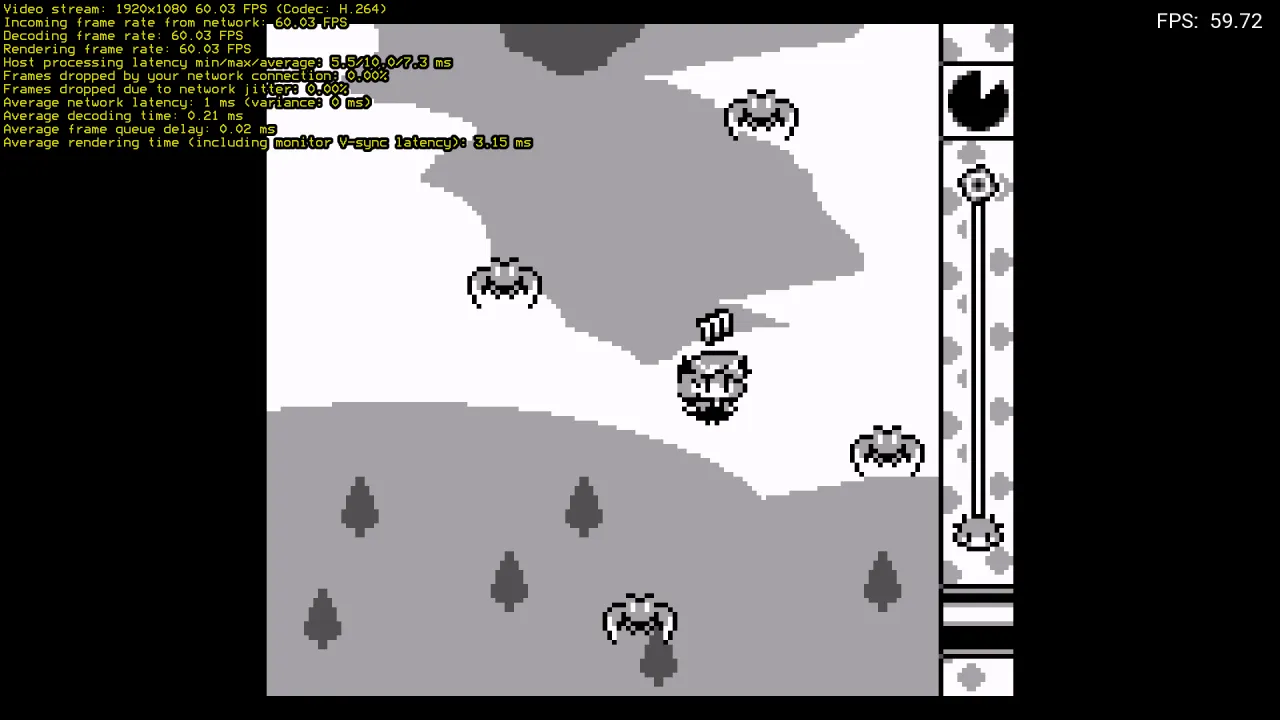
To see whether Tailscale changes anything, we streamed the same game four times, alternating the server’s normal address and its tailnet address:
| Moonlight, 1080p 60 fps H.264 | Without Tailscale | Through Tailscale |
|---|---|---|
| Frame rate received | 60.0 to 60.4 fps | 60.0 fps |
| Server processing (capture + encoding), average | 7.5 to 7.8 ms | 7.3 to 7.4 ms |
| Server processing, max | 10.4 to 10.6 ms | 10.5 to 10.8 ms |
| Frames dropped by the network or by jitter | 0 % | 0 % |
| Decoding time on the client | 0.23 ms | 0.24 to 0.25 ms |
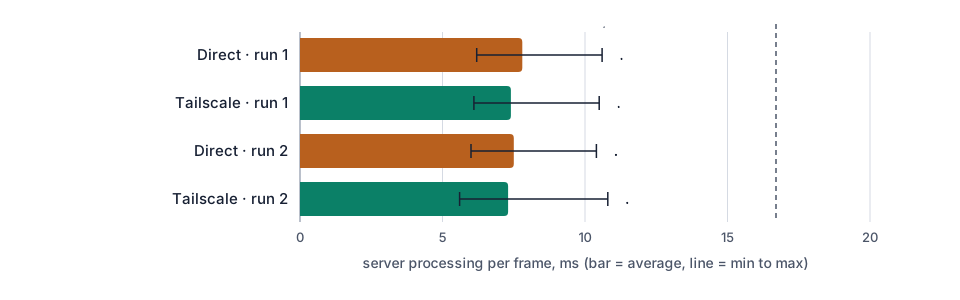
On the server, while streaming, the Tailscale service used 2.8 to 4.2 % of one core, Sunshine 13 to 17 % and the emulator 3 to 4 %. In two earlier runs, done while other test servers were busy with the same GPU, the server-side processing went up to 21 to 27 ms on average: that came from the GPU being shared at that moment, not from Tailscale, as the alternating runs above show.
5. Which plan?
Tailscale itself needs almost nothing. What matters is the game: iGPU Start (2 vCPU, 8 GB of RAM, €14.99 per month excl. VAT) is enough for retro consoles; for PC games we recommend iGPU Power (4 vCPU, 14 GB of RAM, twice the GPU share of Start, €29.99 per month excl. VAT).
Want it ready to play? Ask for it by email when you order (contact@linuxgpu.eu): we can deliver the server with Sunshine, your games’ launcher and Tailscale already installed (server side). You install Moonlight and the Tailscale app on your own devices.
What you can play on it: retro gaming with RetroArch, Sunshine and Moonlight, Windows 11 in the cloud with Sunshine and Moonlight, and Windows games on Linux with Wine.
Systems ready for gaming out of the box. The systems we install by default are already set up for this: Debian 13 with a recent kernel (7.3), the Intel GPU drivers and Mesa (OpenGL, Vulkan, VA-API video encoding), and Windows 11 (option) with Intel’s graphics driver and Remote Desktop rendered on the GPU. No driver to hunt for: install your game and Sunshine, and play.
Try it
See the plans: the dedicated IPv4 option is €5 per month, but with Tailscale you do not need it to play.