Run Windows games on a Linux GPU server with Wine, and stream them
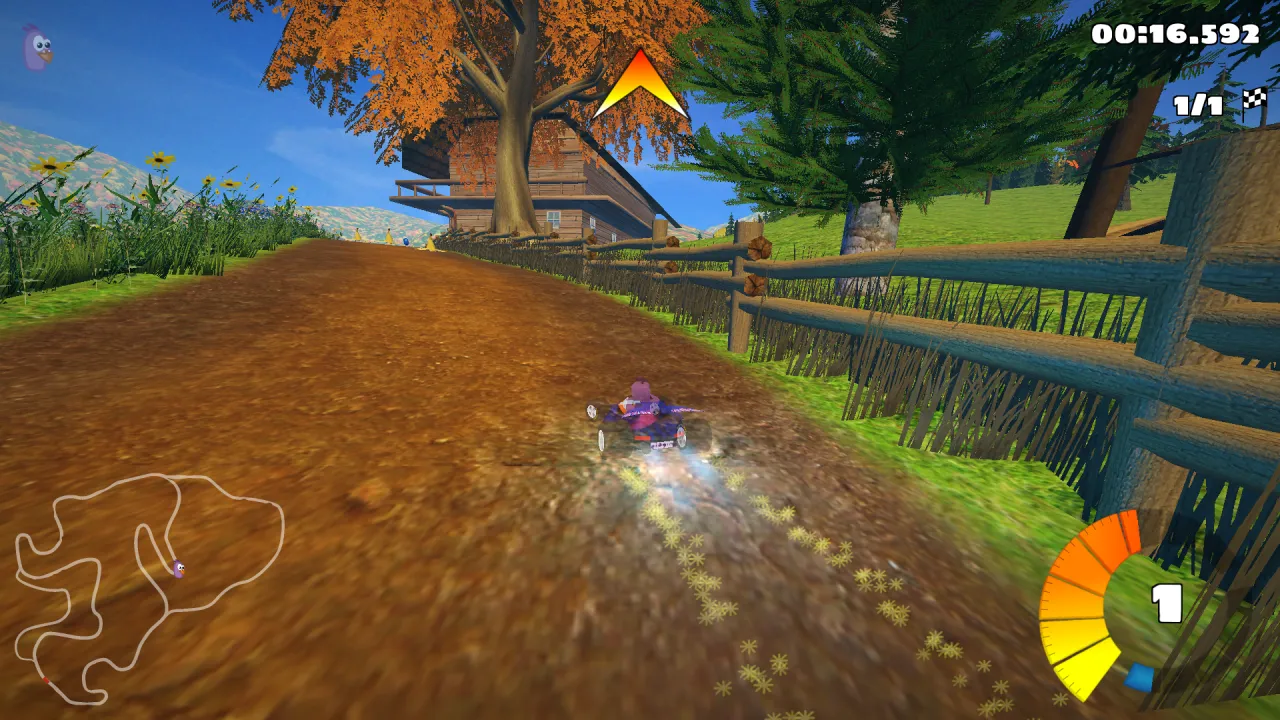
You do not always need Windows to run a Windows program. Wine runs Windows software directly on Linux, and DXVK translates Direct3D 9, 10 and 11 to Vulkan. On a Linux server with a GPU, that means: no Windows licence, a lighter system, and the GPU drivers that come with Linux. We tested it with the Windows version of SuperTuxKart, a well-known free and open-source game, on a Linux GPU server with an Intel UHD 770.
Results at a glance
- The Windows game runs with Wine and is rendered by the GPU (OpenGL 4.6, Mesa, Intel UHD 770).
- About 95 fps at 1080p with V-Sync off, while another virtual machine was using the GPU at the same time.
- Turn V-Sync off: the server’s screen is virtual, V-Sync only makes the game wait for it. Moonlight limits the frame rate on your side.
- Sunshine runs on the Linux server too: it captures the screen and encodes in H.264 or HEVC on the GPU (VA-API), ready for Moonlight.
- Do not use Xvfb for games: its OpenGL runs on the CPU (9 fps in our first Direct3D test under Xvfb). Use a headless Wayland compositor instead (see below).
Test setup
| Item | Value |
|---|---|
| Server | Linux (Debian 13), 4 vCPU, Intel UHD 770 (shared GPU), kernel 7.3, Mesa 25.0 |
| Wine | Wine 10.0 and DXVK 2.6 (Debian packages) |
| Display | sway in headless mode + Xwayland, 1920 × 1080 at 60 Hz |
| Game | SuperTuxKart 1.5, Windows build, built-in benchmark (recorded race, 38 s), OpenGL renderer |
1. A screen for a server without a screen
Games need a display. On a server, the easy answer is Xvfb, a virtual X server, but its OpenGL is rendered by the CPU: our first Direct3D test under Xvfb ran at 9 fps. The answer is sway, a Wayland compositor that can run without a monitor and renders with the GPU, plus Xwayland for X11 programs like Wine:
apt install sway xwayland wine wine64 dxvk-wine64 mesa-vulkan-drivers
mkdir -p ~/.config/sway
cat > ~/.config/sway/config <<'EOF'
output HEADLESS-1 resolution 1920x1080 position 0,0
default_border none
xwayland enable
EOF
export XDG_RUNTIME_DIR=/run/user/$(id -u)
WLR_BACKENDS=headless WLR_RENDERER=gles2 WLR_LIBINPUT_NO_DEVICES=1 \
  WLR_RENDER_DRM_DEVICE=/dev/dri/renderD128 sway &
Check that OpenGL runs on the GPU:
DISPLAY=:0 glxinfo -B | grep renderer
# OpenGL renderer string: Mesa Intel(R) UHD Graphics 770 (ADL-S GT1)
2. Run the Windows game
export DISPLAY=:0 WINEPREFIX=~/.wine-games
wineboot -i
dxvk-setup install --prefix "$WINEPREFIX"   # Direct3D 9/10/11 -> Vulkan
cd SuperTuxKart-1.5-win/stk-code/build-x86_64/bin
wine supertuxkart.exe --screensize=1920x1080 --fullscreen
The game’s log confirms the GPU:
IrrDriver: OpenGL renderer: Mesa Intel(R) UHD Graphics 770 (ADL-S GT1)For Direct3D games, DXVK does the same job over Vulkan: in our test it found the
Intel(R) UHD Graphics 770 (ADL-S GT1).
3. Results
| SuperTuxKart (Windows build), 1080p | Typical | Mostly stable | Steady |
|---|---|---|---|
| Wine on Linux, V-Sync off, GPU shared with another busy VM | 95 to 98 fps | — | — |
| Windows 11 on the same GPU, V-Sync off, for comparison | 111 fps | 96 fps | 69 fps |
Under Wine the game runs close to its Windows speed, even with the GPU shared (Windows figures from our Windows 11 and Sunshine test).
Turn V-Sync off in the game. V-Sync makes the game wait for the next refresh of the screen before showing an image. Here the screen is virtual and nobody looks at it: a game that just misses a refresh waits for the next one and loses frames for nothing. Let Moonlight limit the frame rate instead (60 fps by default).
4. Stream it with Sunshine and Moonlight
Sunshine has a Linux version that captures the sway screen and encodes on the GPU. With
capture = wlr and encoder = vaapi in its configuration, it found:
Found H.264 encoder: h264_vaapi [vaapi]
Found HEVC encoder: hevc_vaapi [vaapi]
Pair Moonlight on your computer, phone or TV box, and you play the Windows game running on the
Linux server. Open the Sunshine web interface through an SSH tunnel
(ssh -L 47990:localhost:47990 root@your-server) rather than exposing it to the Internet.
Wine or Windows?
| Wine on Linux | Windows 11 | |
|---|---|---|
| Price | included | €10 once (option) |
| Compatibility | very good for older and indie games; check ProtonDB or the Wine AppDB | everything that runs on Windows |
| Anti-cheat | usually not | often refused in a virtual machine |
| Setup | sway + Wine + Sunshine | Windows driver + virtual display + Sunshine |
Start with Wine if your game is known to work with it; choose Windows if it is not, or if you need other Windows tools.
Systems ready for gaming out of the box. The systems we install by default are already set up for this: Debian 13 with a recent kernel (7.3), the Intel GPU drivers and Mesa (OpenGL, Vulkan, VA-API video encoding), and Windows 11 (option) with Intel’s graphics driver and Remote Desktop rendered on the GPU. No driver to hunt for: install your game and Sunshine, and play.
Which plan?
Games need CPU and GPU time together. We recommend iGPU Power (4 vCPU, 14 GB of RAM, twice the GPU share of Start): with V-Sync off, on Windows, this game alone used more than half of the 2 vCPU of iGPU Start, and when other servers use the GPU, Power gets twice the GPU time, so fewer frame drops. iGPU Start is enough for 2D games and light tools.
See the plans, iGPU Power from €29.99 per month excl. VAT.