Steam and Proton on a cloud GPU server, streamed with Sunshine and Moonlight
Valve’s Steam Deck and the new Steam Machine run Windows games on Linux with Proton, Valve’s version of Wine. The same software runs on a Linux server in a data centre: install Steam, let Proton run your Windows games on the server’s GPU, and play them on any screen with Sunshine (on the server) and Moonlight (on your side). We tested it on a Linux GPU server with an Intel UHD 770.
Results at a glance
- The Steam client starts on a server without a screen: about 3 minutes from the first launch to the sign-in window, on a headless Wayland display rendered by the GPU.
- Proton runs the Windows game on the GPU: 85 to 96 fps at 1080p (V-Sync off) in the SuperTuxKart benchmark, close to Wine (about 95 fps) and to Windows 11 (111 fps) on the same GPU.
- Streaming with Sunshine does not slow the game down: 83 to 95 fps while streaming 1080p at 60 fps to Moonlight, 9.3 ms of processing on the server on average, no frame dropped.
- We could not sign in to Steam for this test, so Proton was run with umu-launcher, the tool that runs Valve’s Proton without the Steam client. With Steam, you sign in with your own account and turn on Steam Play.
- For gaming, choose iGPU Power: with the GPU share of iGPU Start, while other servers were using the GPU, the same benchmark dropped to 67 to 84 fps.
Test setup
| Item | Value |
|---|---|
| Server | Linux (Debian 13), 4 vCPU (as in iGPU Power), 10 GB of RAM, Intel UHD 770 (shared GPU), kernel 7.3, Mesa 25.0 |
| Display | sway in headless mode + Xwayland, 1920 × 1080, rendered by the GPU |
| Steam | Debian steam-installer package (Steam client, contrib/non-free) |
| Proton | umu-launcher 1.4.4 (GitHub release), which downloaded UMU-Proton 10.0-4 and the Steam Linux Runtime 3.0 |
| Game | SuperTuxKart 1.5, Windows build, built-in benchmark (recorded race, 38 s), OpenGL renderer, V-Sync off |
| Streaming | Sunshine 2026.914 on the server (Wayland capture, H.264 encoded by the GPU with VA-API), Moonlight 6.2 on a second Linux server, 1080p 60 fps |
| Network | client and server in the same data centre: on the Internet, add your connection’s latency |
Other virtual machines were using the shared GPU heavily during the whole test (between two thirds and 87 % of the GPU’s time when our server was idle): the figures below are what you get on a busy shared GPU, not on an empty one.
1. A screen for Steam on a server
Steam needs a display, and it refuses to run as root. We created a normal user and started sway, a Wayland compositor that runs without a monitor and renders with the GPU, plus Xwayland for Steam and Windows games (Xvfb would render on the CPU):
dpkg --add-architecture i386
apt install sway xwayland steam-installer mesa-vulkan-drivers mesa-vulkan-drivers:i386 \
  libgl1-mesa-dri:i386 intel-media-va-driver-non-free
# as the gaming user:
mkdir -p ~/.config/sway
printf 'output HEADLESS-1 resolution 1920x1080\nxwayland enable\n' > ~/.config/sway/config
WLR_BACKENDS=headless WLR_RENDERER=gles2 WLR_LIBINPUT_NO_DEVICES=1 \
  WLR_RENDER_DRM_DEVICE=/dev/dri/renderD128 sway &
DISPLAY=:0 steam &
The first launch downloads and updates the Steam client (1.4 GB in ~/.local/share/Steam), then
shows the sign-in window, about 3 minutes and 20 seconds after the first start.
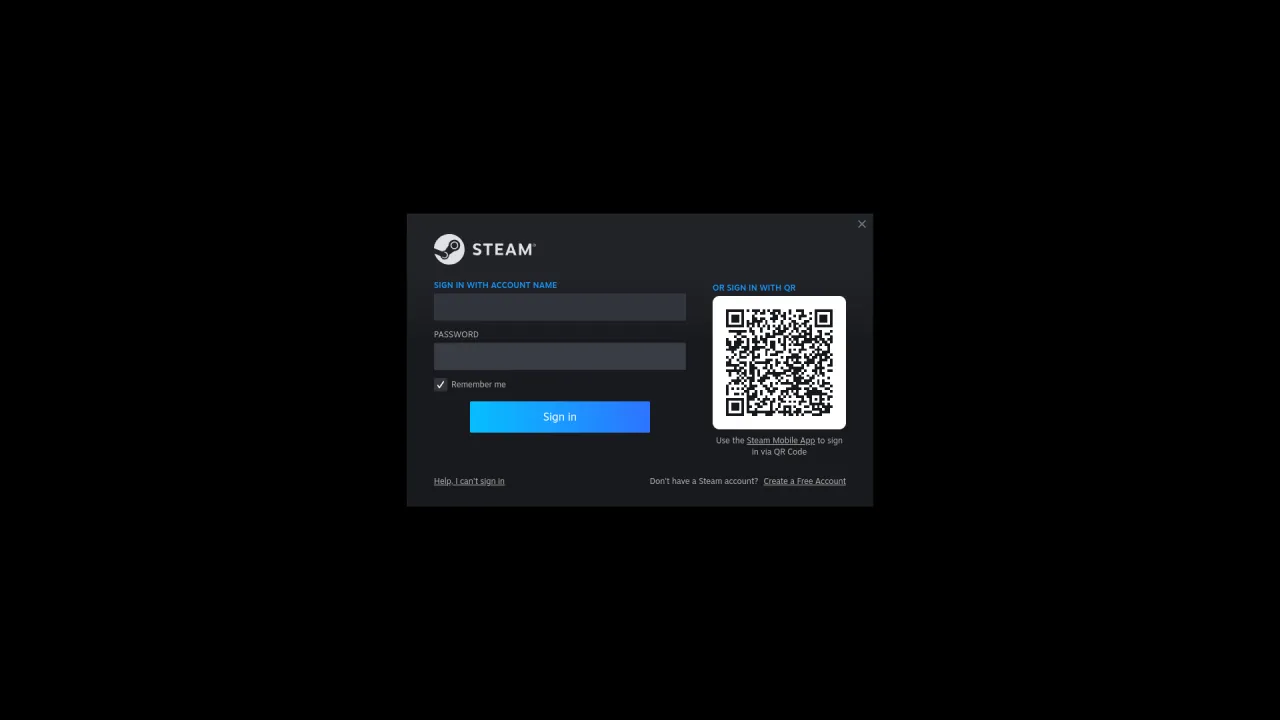
With your own account: sign in (through Moonlight or a remote desktop, the first time), then in
Steam → Settings → Compatibility, turn on Steam Play for all other titles and choose a Proton
version. Windows games then install and start like Linux games. To play with a controller from the
sofa, start Steam in Big Picture mode (steam -gamepadui), which is also the interface of the Steam
Machine.
2. Proton without a Steam account: umu-launcher
Signing in to Steam was not possible for this test, so we used umu-launcher, the launcher used by Lutris and Heroic to run Proton outside Steam. It runs a Windows game with Proton inside the same Steam Linux Runtime container that Steam uses:
export WINEPREFIX=~/prefixes/stk GAMEID=umu-default
./umu-run supertuxkart.exe --screensize=1920x1080 --fullscreen --benchmark
On the first run, umu-launcher downloaded UMU-Proton 10.0-4 (1.4 GB unpacked) and the Steam Linux Runtime 3.0 “sniper” (800 MB) and created the Windows prefix (900 MB), in less than a minute on the server’s connection. The game’s log confirms that Proton draws on the GPU:
IrrDriver: OpenGL renderer: Mesa Intel(R) UHD Graphics 770 (ADL-S GT1)
IrrDriver: OpenGL version string: 4.6 (Core Profile) Mesa 25.0.7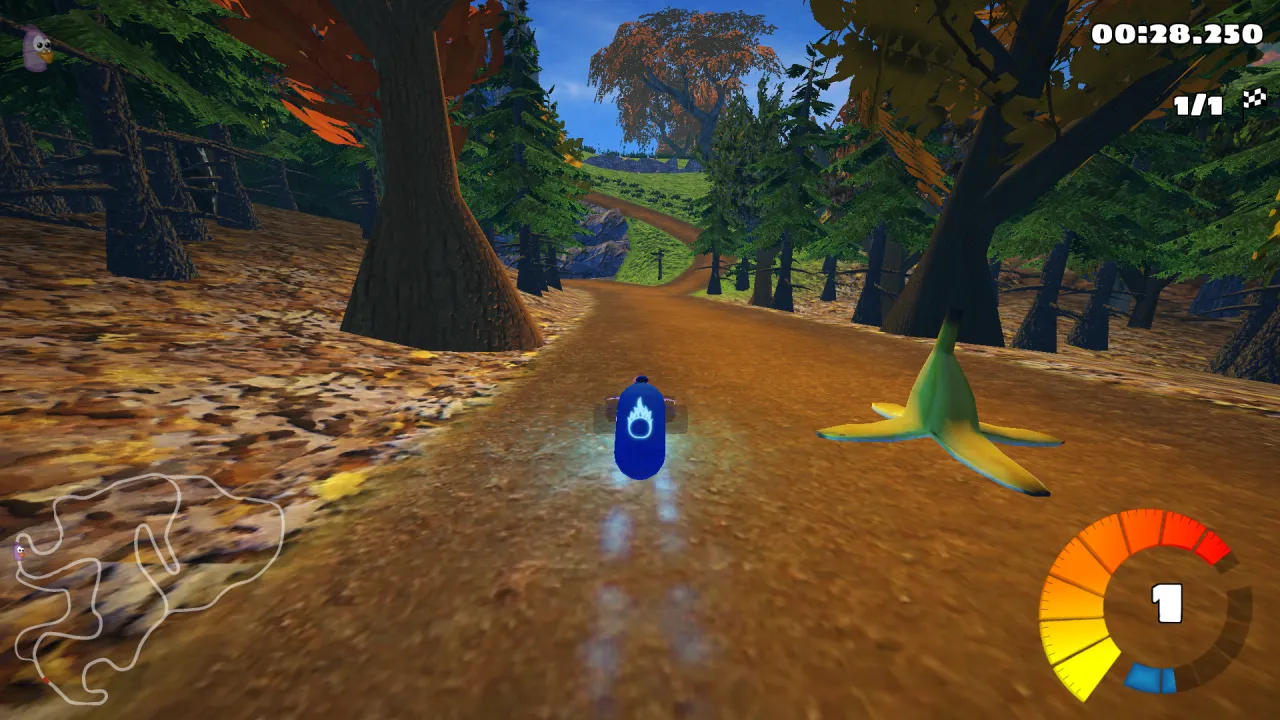
3. Results
V-Sync turned off in the game (swap-interval-vsync="0" in SuperTuxKart’s config.xml): the
server’s screen is virtual, and V-Sync only makes the game wait for it.
| SuperTuxKart (Windows build), 1080p, Proton | Typical | Mostly stable | Steady |
|---|---|---|---|
| GPU share of iGPU Power, 2 runs | 85 to 96 fps | 70 to 83 fps | 52 to 69 fps |
| GPU share of iGPU Power, streaming to Moonlight, 2 runs | 83 to 95 fps | 58 to 75 fps | 44 to 58 fps |
| GPU share of iGPU Start, 4 runs | 67 to 84 fps | 59 to 71 fps | 45 to 61 fps |
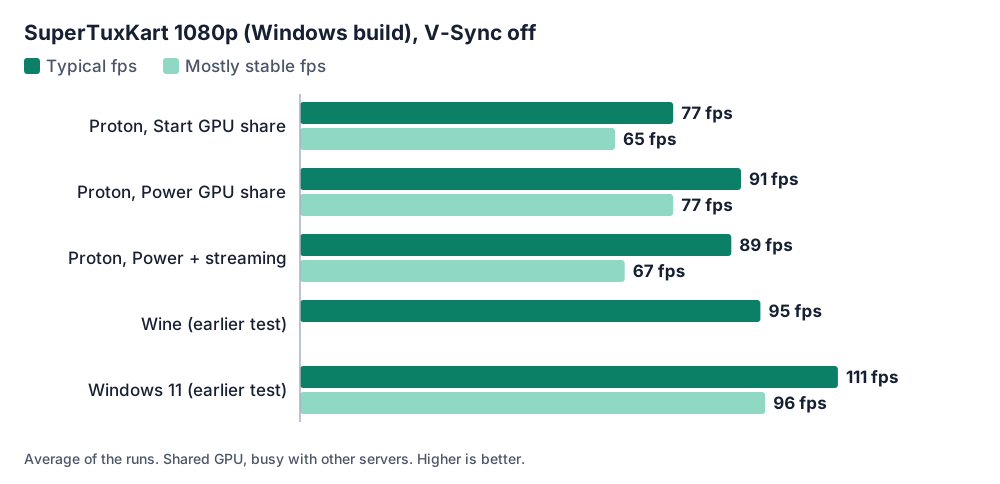
For comparison, on the same GPU: about 95 fps with Wine and 111 fps on Windows 11. Proton is a Wine with Valve’s additions; for an OpenGL game like this one, it gives the same speed.
The game used about 10 % of the 4 vCPU on average, about 30 % with Sunshine capturing and encoding at the same time. The whole server used 3.2 GB of RAM during the run (sway, game, Sunshine).
4. Streaming with Sunshine and Moonlight
Sunshine for Linux captures the sway screen and encodes on the GPU. Its configuration:
capture = wlr
encoder = vaapi
adapter_name = /dev/dri/renderD128
It needs the Intel media driver (intel-media-va-driver-non-free); without it, Sunshine finds no
encoder. With it:
Creating encoder [h264_vaapi]
vaapi vendor: Intel iHD driver for Intel(R) Gen Graphics - 25.2.3
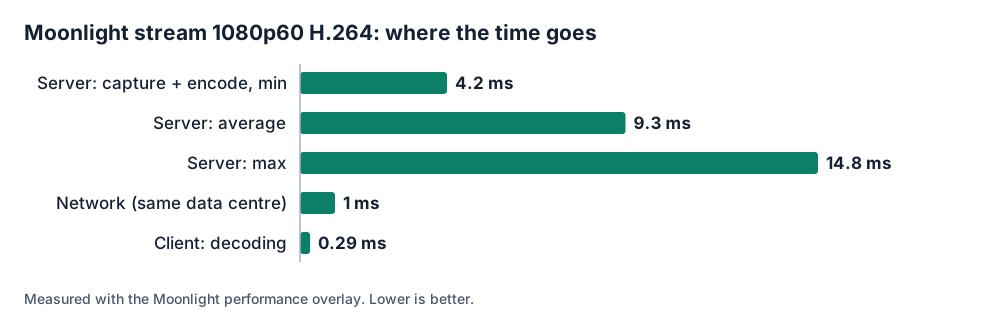
We paired a Moonlight client running on a second Linux server in the same data centre and noted its performance overlay while the game ran:
| Moonlight statistic (1080p, H.264, 60 fps) | Value |
|---|---|
| Frames received and displayed | 59.8 fps |
| Server processing (capture + encoding), min / average / max | 4.2 / 9.3 / 14.8 ms |
| Frames dropped by the network or by jitter | 0 % |
| Network latency (same data centre) | 1 ms |
| Decoding time on the client | 0.29 ms |
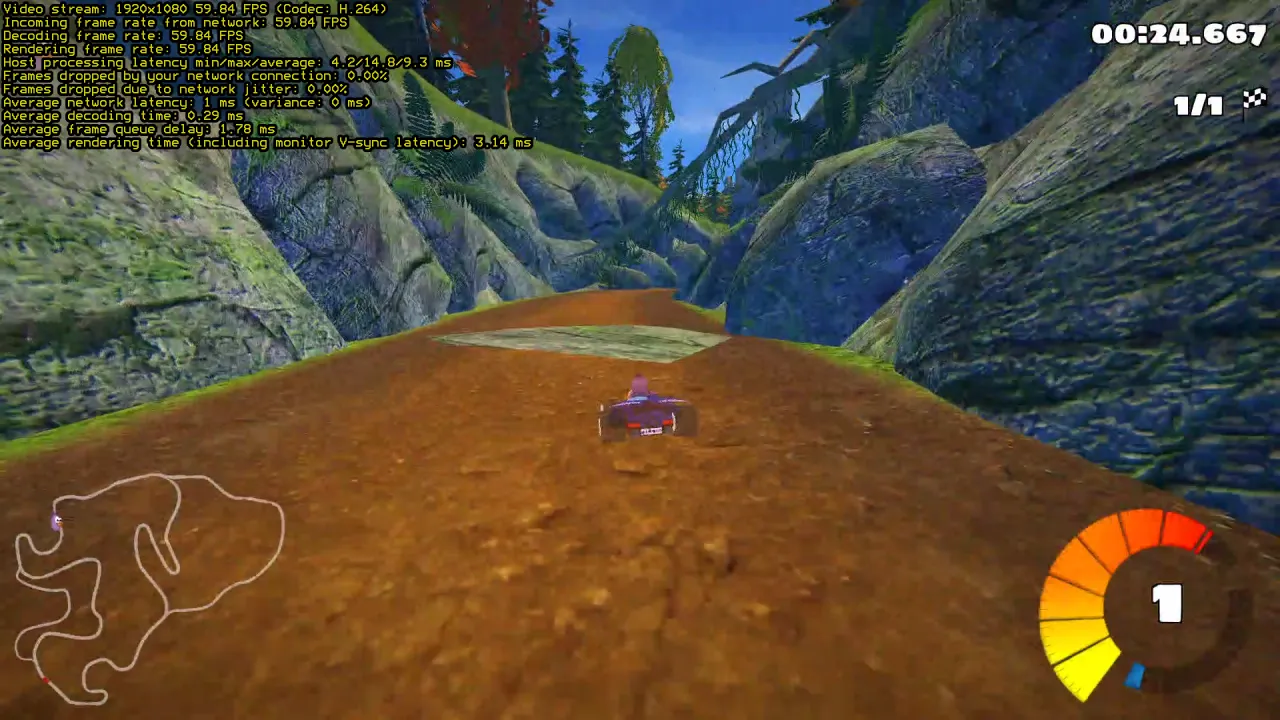
Open Sunshine’s web interface through an SSH tunnel (ssh -L 47990:localhost:47990 user@your-server)
rather than exposing it to the Internet. Sunshine on Linux comes with a “Steam Big Picture” entry
that you can choose in Moonlight. Your total latency will mostly depend on your Internet connection to the server
(Germany): a good fibre connection in Europe typically adds 10 to 30 ms.
Limits to know
- Anti-cheat: many online games with anti-cheat refuse Proton or virtual machines. Check ProtonDB before buying a game for this.
- This GPU is an integrated GPU: fine for indie games, older games and 2D/3D games of the 2010s, not for recent AAA games at 1080p.
- Audio: the server has no sound card. For sound in Moonlight, run PipeWire or PulseAudio in the gaming session; we did not test sound here.
Systems ready for gaming out of the box. The systems we install by default are already set up for this: Debian 13 with a recent kernel (7.3), the Intel GPU drivers and Mesa (OpenGL, Vulkan, VA-API video encoding), and Windows 11 (option) with Intel’s graphics driver and Remote Desktop rendered on the GPU. No driver to hunt for: install your game and Sunshine, and play.
Which plan?
We recommend iGPU Power (4 vCPU, 14 GB of RAM, twice the GPU share of iGPU Start). When other servers use the GPU, the GPU time each server gets follows its share: in our test, the same benchmark went from 67 to 84 fps with the share of Start to 85 to 96 fps with the share of Power. iGPU Start (2 vCPU, 8 GB) remains fine for 2D games and light tools.
Want it ready to play? Ask for it by email when you order (contact@linuxgpu.eu): we can deliver the server with Steam, the headless display and Sunshine already installed and set up. You sign in to Steam with your own account and install Moonlight on your computer, phone or TV box.
If a game does not run with Proton, the Windows 11 option (€10, paid once) gives you a full Windows: see Windows 11 in the cloud with Sunshine and Moonlight.
See the plans: iGPU Power is €29.99 per month excl. VAT.