WinBoat or Wine: running Windows apps on a Linux GPU server
There are two ways to run a Windows program on Linux. Wine (and Proton, Valve’s version of it) translates Windows calls to Linux: no Windows inside, and the program uses the Linux GPU drivers. WinBoat does the opposite: it runs a real Windows 11 in a Docker container (the dockur/windows project, with QEMU/KVM) and shows each Windows app as a Linux window through FreeRDP’s RemoteApp mode. We tested WinBoat on a Linux GPU server without a screen and compared it with Wine.
Results at a glance
- WinBoat runs on a server without a screen: its interface is an Electron app that we drove on a virtual display. It found Docker, KVM and FreeRDP and installed Windows 11 Pro by itself.
- 16 minutes to install: 1.5 minutes to download Windows 11 from Microsoft (8.5 GB), 14 minutes of unattended installation. Then 19 GB used on the server’s disk.
- 4.2 GB of RAM held as long as Windows runs, about 0.4 vCPU when Windows is idle.
- No GPU in Windows: Windows only sees a “Red Hat VirtIO GPU DOD controller” and the “Microsoft Remote Display Adapter”, without 3D acceleration. WinBoat 0.9.2 does not pass the GPU through.
- Seamless app windows did not work headless: the RDP connection needs a sound server, then the RemoteApp windows either failed (sway) or stayed frozen (Xvfb). The full Windows desktop over RDP worked.
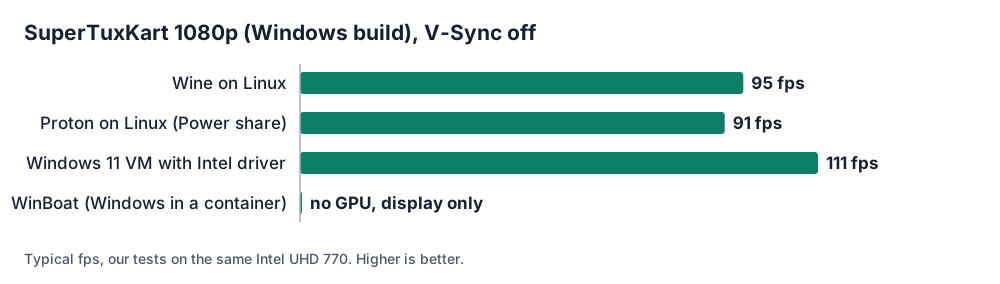
- Wine and Proton keep the GPU: the same Windows game reached about 95 fps with Wine and 85 to 96 fps with Proton, on the same Intel UHD 770.
Test setup
| Item | Value |
|---|---|
| Server | Linux (Debian 13), 4 vCPU, 10 GB of RAM, Intel UHD 770 (shared GPU), kernel 7.3, KVM available inside the server (nested virtualisation) |
| WinBoat | 0.9.2 (.deb from GitHub), Docker 29.9, FreeRDP 3.15 |
| Windows | Windows 11 Pro, English, WinBoat defaults: 2 cores, 4 GB of RAM, 32 GB disk, image dockur/windows:6.05 (800 MB) |
| Display | headless sway (Wayland + Xwayland), then Xvfb for the RemoteApp test |
1. Installing WinBoat on a server
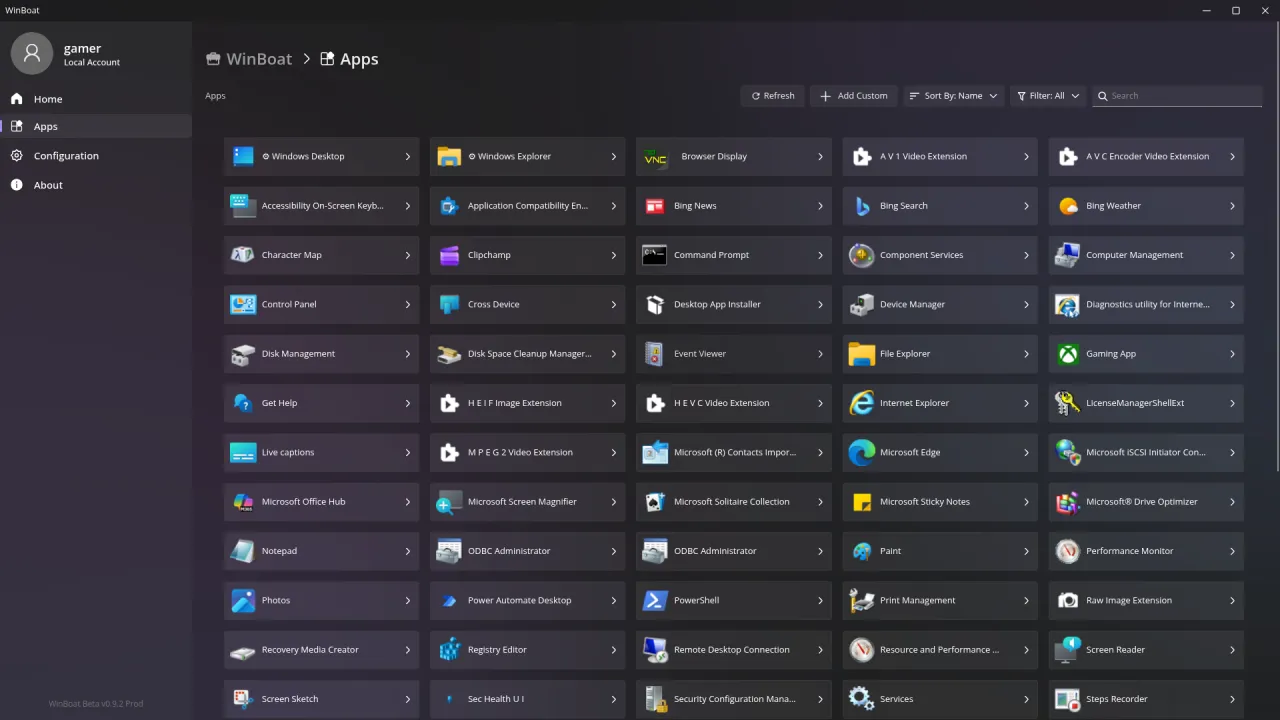
WinBoat checks its requirements in a setup wizard: at least 4 GB of RAM, KVM, Docker with Compose v2 and FreeRDP 3. Our server had all of them, KVM included: the server is itself a virtual machine, and WinBoat starts a second one inside it.
apt install ./winboat-0.9.2-amd64.deb freerdp3-x11
usermod -aG docker,kvm youruser
The wizard asks for a Windows version, a language, a Windows user name and password, and the
resources to give Windows. After you click Install, WinBoat writes a docker-compose.yml,
downloads Windows 11 from Microsoft and installs it without any further question:
| Step | Duration |
|---|---|
| Download of Windows 11 (8.5 GB ISO) | 1 min 30 s |
| Unattended Windows installation | 14 min 08 s |
| Total, from “Install” to “Windows has been installed successfully” | 15 min 52 s |
2. What it costs
| Resource | Measured |
|---|---|
| RAM held by the container | 4.15 GiB, all the time Windows runs |
| CPU during installation | 1 to 2 cores |
| CPU for the first 15 minutes after installation | about 2 cores (Windows finishing its setup) |
| CPU with Windows idle | about 0.4 vCPU, short peaks at 1.3 |
| Disk on the server | 19 GB: 8.5 GB of ISO kept in the folder + 11 GB for the Windows disk |
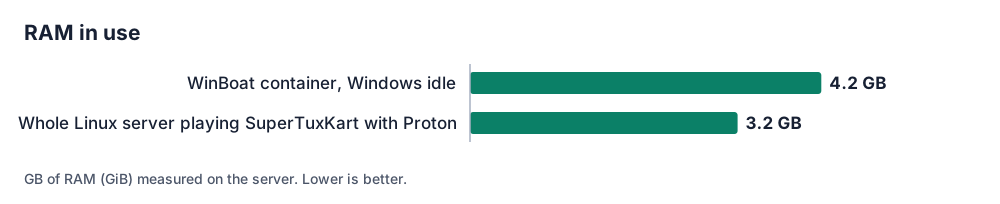
On a server with 8 GB of RAM, WinBoat’s Windows takes half of it before you open a single application. With Wine, there is nothing to reserve: only the program you run uses memory.
3. The GPU inside Windows
We opened PowerShell in Windows and listed the display adapters:
Name          : Red Hat VirtIO GPU DOD controller
Name          : Microsoft Remote Display Adapter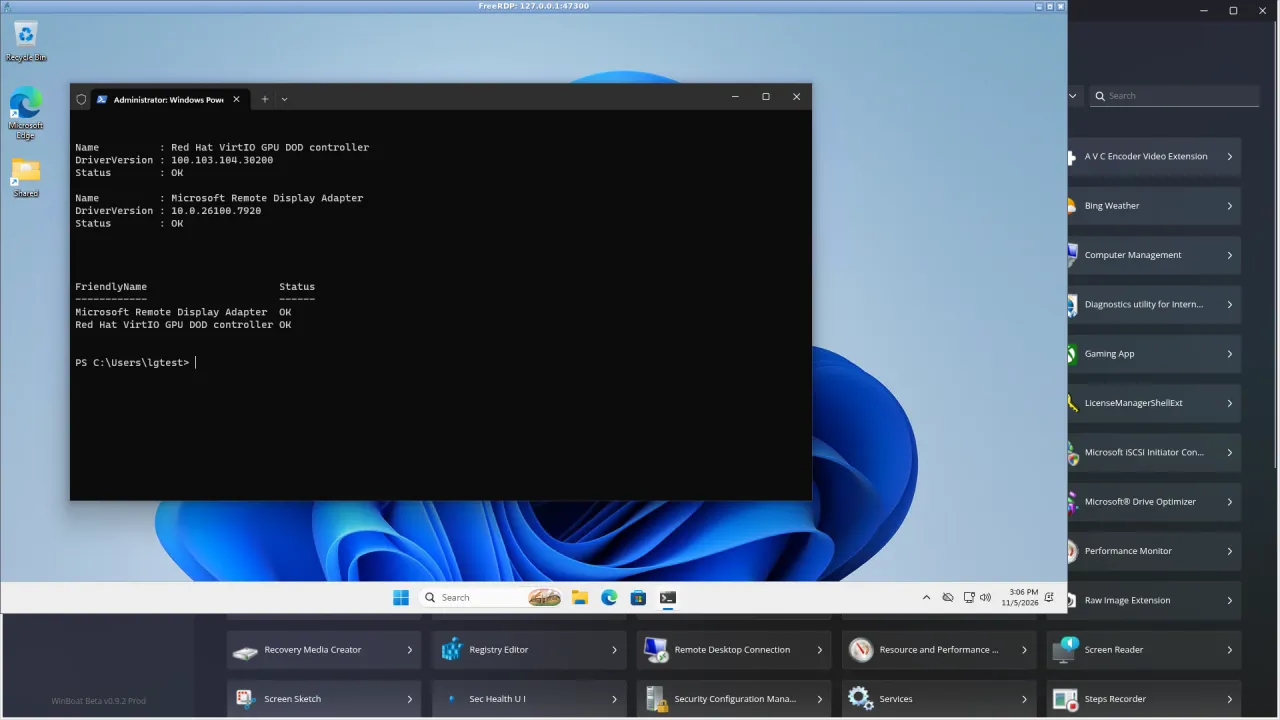
The container receives /dev/kvm but not the GPU, and the “DOD” (display-only) driver has no 3D. So
Windows draws everything on the CPU: fine for an office application, not for a game. WinBoat’s
developers announce GPU acceleration for version 1.0. That is why we did not run the SuperTuxKart
benchmark in WinBoat:
4. App windows on a server without a screen
WinBoat’s main feature is to show each Windows app as its own Linux window (FreeRDP RemoteApp). On our headless server:
- The first launch failed (
FreeRDP process returned error code '138'): WinBoat asks FreeRDP for sound through PulseAudio, and a server has no sound server. Starting PipeWire’s PulseAudio service in the session fixed it (apt install pipewire-pulse wireplumber). - On the sway virtual display (Xwayland), FreeRDP then stopped with an X11
BadMatcherror as soon as the app window opened. - On Xvfb with a simple window manager, the Notepad windows opened (the window list showed “Untitled - Notepad”) but their content stayed frozen on the Windows sign-in image.
- The full Windows desktop over RDP worked straight away (video at the top of this article).
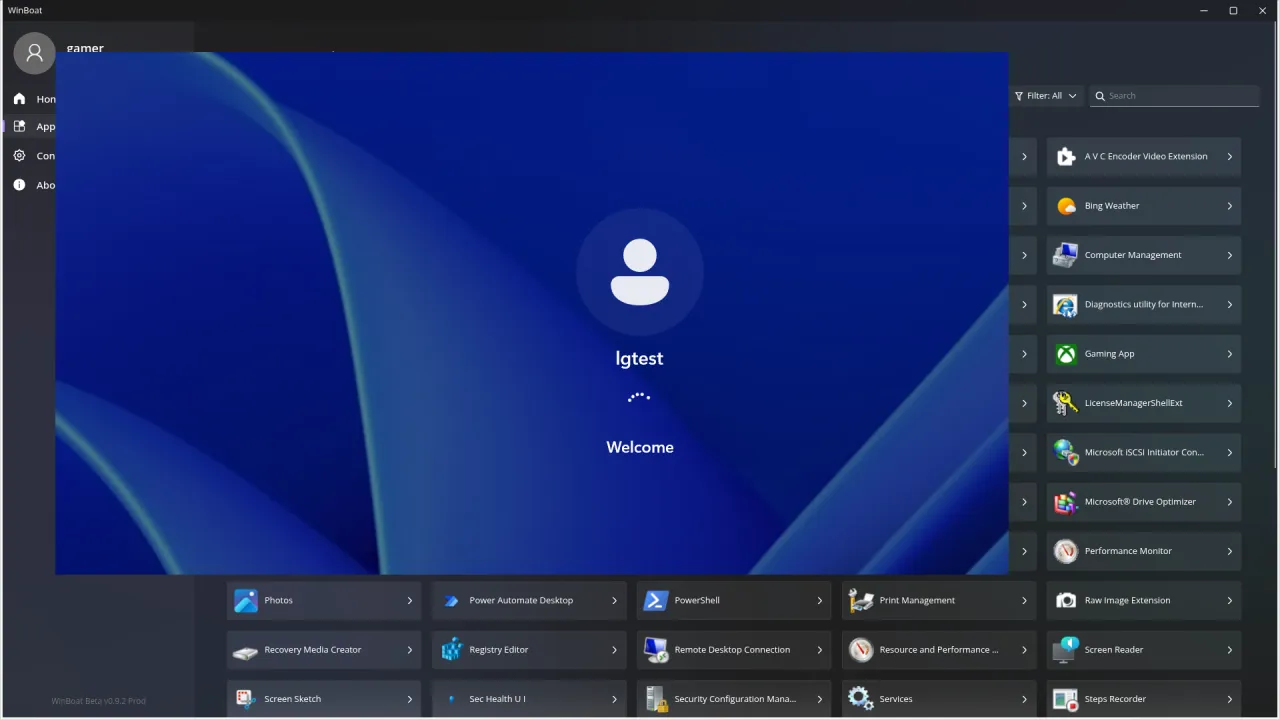
WinBoat is designed for a Linux desktop PC with a real screen. On a server, use the full Windows
desktop (Remote Desktop, from your computer through an SSH tunnel to port 47300) or run
dockur/windows directly with Docker Compose: it is what WinBoat uses underneath.
WinBoat, Wine/Proton or Windows 11?
| Wine / Proton | WinBoat | Windows 11 option | |
|---|---|---|---|
| What runs | the Windows program, on Linux | a full Windows in a container | Windows 11 Pro on the whole server |
| GPU for the program | yes (OpenGL, Vulkan, DXVK) | no | yes (Intel driver) |
| SuperTuxKart 1080p | about 95 fps (Wine), 85 to 96 fps (Proton) | not run, no GPU | 111 fps |
| RAM held | only what the program uses | 4 GB for Windows | the whole server |
| Setup | minutes | 16 min, automatic | installed for you |
| Best for | games and programs known to work | office and business apps that refuse Wine | everything else |
Our advice:
- Games: Wine or Proton, on the GPU. See Steam and Proton on a cloud GPU server and Windows games with Wine.
- A Windows office or business application that does not run with Wine: WinBoat (or dockur/windows) works, as long as you give it 4 GB of RAM and use the full Windows desktop on a server.
- Everything else, or a Windows program that needs the GPU: the Windows 11 option (€10, paid once), with Intel’s graphics driver.
WinBoat needs KVM inside your server (nested virtualisation). It worked on our test server; ask us by email to make sure it is enabled on yours. With 4 GB held by Windows, choose iGPU Power (4 vCPU, 14 GB of RAM) rather than iGPU Start (2 vCPU, 8 GB).
Want it ready to use? Ask for it by email when you order (contact@linuxgpu.eu): we can deliver the server with Wine, WinBoat or Steam already installed and set up on the server side.
Systems ready for gaming out of the box. The systems we install by default are already set up for this: Debian 13 with a recent kernel (7.3), the Intel GPU drivers and Mesa (OpenGL, Vulkan, VA-API video encoding), and Windows 11 (option) with Intel’s graphics driver and Remote Desktop rendered on the GPU. No driver to hunt for: install your game and Sunshine, and play.
Try it
See the plans: iGPU Power is €29.99 per month excl. VAT, iGPU Start €14.99.